Gesture as geometry
This section has one path: learn how sampled input becomes clean geometry, practice reading one repeatable gesture, then solve one tested drawing problem.
- Lesson: understand sampled gestures
- Practice: inspect, draw, and tune
- Exercise: build a tested gesture mark
Lesson
A gesture is a list of observations
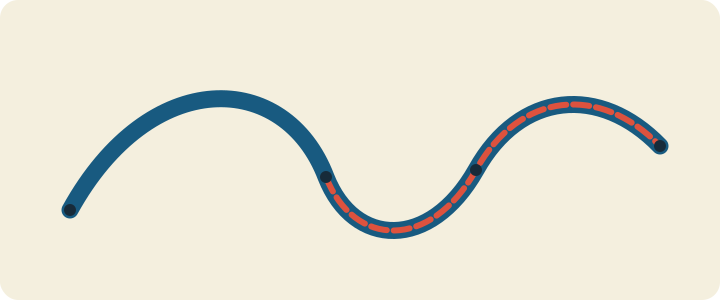
Sampled movement changes the path’s width, color, and shape.
Dragging a pointer gives the program a list of sampled positions. Raw samples are uneven: several may be almost identical, followed by a larger gap. The model cleans that list before drawing:
- reject points that are too close;
- smooth sudden measurement jumps;
- estimate velocity from displacement and elapsed time;
- measure turns and cumulative path length; and
- keep the history within a fixed cap.
Study the course’s credited precedent notes for sampling ideas, not a target image. Credit creators, then change input, mark construction, mapping, motion, and composition.
Events observe; the model decides
The openFrameworks
event reference
describes pointer and keyboard callbacks. ofApp turns either route into a
point and time, keeps stroke centers inside the window, and calls addSample.
Filtering, smoothing, pruning, velocity, curvature, and length remain plain C++
so tests can replay observations without a window.
Drag to sample with a pointer. Arrow keys move a visible fallback cursor and sample the same model; C clears it. Nothing autoplays, flashes, or uses audio. If either window dimension is smaller than the full maximum stroke width, capture is suppressed so the clamp interval cannot invert.
A vector owns a limited sequence
std::vector
stores contiguous Sample records. size() counts live samples; capacity()
counts storage available before another allocation. push_back grows size,
erase(begin()) removes the oldest item, and clear() makes size zero without
promising to release capacity.
Never index an empty vector or retain pointers, references, or iterators across a growth or erase. This model filters before growth and prunes after growth:
if (distance(last.raw, raw) < minimum_distance) return false;
samples.push_back(next);
if (samples.size() > maximum_samples) samples.erase(samples.begin());
The production code erases all excess in one range. A deque could prune the front more cheaply, but the explicit vector cap keeps memory and work bounded.
Filtering and time-aware smoothing solve different problems
Minimum-distance filtering compares a new raw point with the last accepted raw point. A distance strictly below the threshold is rejected; equality is accepted. Rejected input changes neither time, length, nor velocity. A zero threshold accepts duplicates, so later calculations still need degenerate checks.
A fixed per-frame blend changes with frame rate. Instead the model uses a form of exponential smoothing :
alpha = 1 - exp(-k * dt)
smoothed = current + alpha * (target - current)
For a fixed target, one one-second step and two half-second steps agree within
floating-point tolerance. Larger k follows the target more quickly. NaN,
infinite, zero, or negative dt leaves the smoothed position and stored valid
time unchanged and produces zero velocity. Non-finite points and timestamps are
rejected.
Velocity, turns, and length describe the mark
Velocity is (current - previous) / dt; speed is its magnitude. Invalid or
non-positive time returns (0, 0) rather than dividing by zero. The exercise
maps slow samples to wider marks and fast samples to narrower marks, but that is
a design choice rather than a physical law.
For incoming vector a and outgoing vector b:
signed_turn = atan2(cross(a,b), dot(a,b))
A straight continuation is zero. In positive-down screen coordinates, right to
down is positive pi/2; the opposite turn is negative. If either segment is
nearly zero length, the turn is zero. Width and facet or dot shape must still
communicate differences without color.
Cumulative arc length starts at zero and adds the distance between consecutive smoothed points. It measures travel along the path, not straight-line distance from the start.
Optional resampling walks distance, not event count
The supplied helper can convert a finished path into evenly spaced points. It
removes exact consecutive duplicates and non-finite points, accumulates segment
lengths, then interpolates at spacing * i. This follows the broad idea of
polyline resampling
,
while the exercise tests define the exact behavior.
The helper preserves the first and final distinct endpoints. Empty and single
input stay empty or single; a short path returns both endpoints; all duplicates
become one point. Spacing below 0.001 or output above 100,000 points returns an
empty result before allocation. The starter does not draw resampled points
unless you choose to wire in that extension.
Practice
Practice is guided and has no unit-test gate. Read one saved path, build the adapter, compare two input routes, and tune one mapping visibly.
1. Predict the corner sample
A pointer reports (0, 0), (10, 0), then (10, 10), one second apart. With
no distance filter and k = log(2), predict the smoothed points, second-sample
velocity, signed turn at the corner, and cumulative smoothed length. Add a
duplicate point and zero-time step; identify the divisions that need guards.
2. Inspect the saved expected values
Linux or macOS:
cat exercises/08-gesture-as-geometry/fixtures/gesture-oracle.txt
Windows Developer PowerShell:
Get-Content .\exercises\08-gesture-as-geometry\fixtures\gesture-oracle.txt
For the corner row, confirm smoothed position (17.5, 15), speed about
5.590170, signed turn about 1.107149, and cumulative length about
10.590170. Explain which earlier smoothed segment contributes to each value.
3. Build and draw through both input routes
Set OF_ROOT to openFrameworks 0.12.1. Linux or macOS:
scripts/section-08.sh generate --project starter
scripts/section-08.sh build --project starter --configuration Release
exercises/08-gesture-as-geometry/starter/bin/starter
Windows Developer PowerShell:
.\scripts\section-08.ps1 generate -Project starter
.\scripts\section-08.ps1 build -Project starter -Configuration Release
& .\exercises\08-gesture-as-geometry\starter\bin\starter.exe
Drag slowly, then quickly, then turn sharply. Use arrows to add another path and C to clear. Confirm that speed changes width and corners change palette and geometry. Resize: the path should clear, the keyboard cursor should recenter, and tiny viewports should suppress capture until the window grows.
4. Tune one visible relationship
In a disposable edit to
starter/src/design/gesture_design.cpp, change only the minimum-distance
threshold or smoothing rate. Predict whether the mark will gain samples, lose
samples, lag more, or follow more quickly. Rebuild and compare both input
routes, then restore the file if you do not want to keep the change:
git restore -- exercises/08-gesture-as-geometry/starter/src/design/gesture_design.cpp
That command discards every uncommitted change in the named file.
Exercise
Problem: turn sampled motion into a geometric mark
Capture a finite pointer or keyboard gesture. Filter and smooth it, map speed to width, map turning to palette or shape, and keep every history and output count bounded. Create geometry unlike the starter ribbon and solution facets. Explain your minimum-distance, smoothing, capacity, width, and curvature choices.
Open the
Exercise 08 brief, starter, tests, and solution
,
then edit starter/src/design/gesture_design.cpp and
starter/src/ofApp.cpp. Keep makeGestureDesign() and the declarations in
shared/gesture_model.h unchanged.
Run the unit tests
Linux or macOS:
CXX=g++ tests/run-section-08-tests.sh
CXX=clang++ tests/run-section-08-tests.sh
Windows Developer PowerShell:
.\tests\run-section-08-tests.ps1
Tests check strict fixture parsing, growth, filtering, pruning, capacity, time-aware smoothing under different partitions, invalid time, guarded velocity, straight/corner/duplicate turns, cumulative length, uniform resampling limits and endpoints, finite stroke-aware bounds, repeatable replay, variation, and your design mappings. No screenshot decides correctness.
For one test-driven repair, temporarily remove the dt <= 0.0f guard from
guardedVelocity in shared/gesture_model.cpp. Predict the zero-time failure,
run the suite, restore the guard, and require a green run. Then generate and
compile starter and solution in Debug and Release and inspect both input routes.
Quick visual check
- Pointer and arrow-key routes both create understandable marks; C clears.
- Nothing autoplays or flashes, and there is no audio-only information.
- Width or shape, not color alone, communicates speed and corner changes.
- Palette/background pairs have suitable contrast.
- Resize clears and recenters; tiny viewports safely suppress capture.
- Strokes remain visible at tiny, narrow, square, wide, and edge positions.
- Geometry, mapping, spacing, and palette differ from both examples.
- Alt text names direction, speed-width changes, corners, geometry, and palette.
- Reused references are credited.
If you get stuck
Inspect points before the renderer. Check the distance threshold, elapsed time, and history cap one at a time, then rerun the smallest failing test. A gesture is a short story told by points; when it gets noisy, ask which point should not have been invited.