Local coordinate systems
This section has one path: learn how child geometry inherits a parent’s measuring space, practice predicting a transform chain, then build one tested sculpture.
- Lesson: understand local coordinates
- Practice: calculate, build, and inspect
- Exercise: create a tested hierarchy
Lesson
A child can measure from its parent
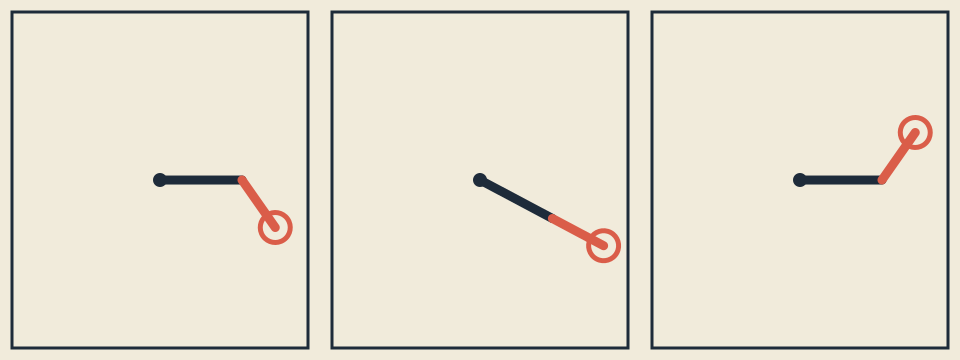
One hierarchy at three times: each child anchor inherits its parent’s local coordinate system.
A child shape is easier to place relative to a parent than relative to the whole window. “Put the small arm 40 pixels from the end of the large arm” remains true when the large arm moves or rotates. That relative measuring space is a local coordinate system.
The hierarchy reads from broad placement to specific geometry:
viewport center and fit
  -> parent rotation
    -> first-arm translation
      -> child rotation
        -> child endpoint
Changing a parent moves every descendant. Changing the child affects only its
branch. The child can begin at (0, 0) and end at (second_length, 0); the
parent transform carries those simple points into the window.
Scope keeps transforms from leaking
ofPushMatrix() saves the current measuring space. Translation, rotation, and
scale change it; ofPopMatrix() restores it. A { ... } block gives names
lexical scope
and also makes a temporary coordinate system visible:
{
    MatrixScope child_scope;
    ofTranslate(first_length, 0.0f);
    ofRotateDeg(child_angle);
    drawChildInLocalCoordinates();
}
MatrixScope calls ofPushMatrix() in its constructor and ofPopMatrix() in
its destructor. C++ runs the destructor when control leaves the block, even
through an early return. The language’s
destructor rules
explain the mechanism. This narrow acquire-and-restore pattern is RAII; it
does not require pointers or manual allocation. The
openFrameworks graphics reference
documents the matrix calls.
The guard cannot be copied, so one push cannot accidentally produce two pops. A helper should accept only the local length, radius, or scene record it needs.
Translation, rotation, and scale compose
translation(x, y)moves the local origin.rotationDegrees(angle)turns both local axes around that origin.scaling(x, y)changes the size and orientation of the axes.
The pure model stores these operations as three-by-three matrices. Imagine a 2D
point as (x, y, 1); the extra 1 is bookkeeping that lets translation join
rotation and scale in the same table.
For rotation:
new x = cos(angle)*x - sin(angle)*y
new y = sin(angle)*x + cos(angle)*y
At positive 90 degrees, (1, 0) becomes (0, 1). Because openFrameworks y
increases downward, that looks clockwise on screen. Say whether you mean the
numeric sign or the visual direction.
Order changes the answer
With column-style points, parent * local * point applies the rightmost
operation first:
translation(10, 0) * rotation(90) * point(1, 0) = (10, 1)
rotation(90) * translation(10, 0) * point(1, 0) = (0, 11)
The same operations land in different places because rotation also turns the axis used by translation. Transform functions do not commute. MDN’s visual transform guide shows the same composition idea; this exercise’s C++ model defines its exact order.
The model writes the hierarchy explicitly:
root = viewport_translation * responsive_scale * parent_rotation
child = root * first_arm_translation * child_rotation
transformPoint(root, {first_length, 0}) gives the elbow.
transformPoint(child, {second_length, 0}) gives the tip.
Repeatable motion and safe bounds
Parent angle uses sine and child angle uses cosine. Time wraps into
[0, period), including negative time; NaN or infinite time maps to zero.
Adding one period produces the same anchors.
A finite zero scale may deliberately collapse an axis. A scale containing
NaN or infinity leaves the point unchanged. Design lengths, period, radius,
stroke, matrices, and intermediate results must be finite; lengths and sizes
must be positive and colors must stay from 0 through 255.
A viewport smaller than 48 × 48 is invalid. Legal scenes reserve half the
stroke plus two pixels and keep total arm reach and ornament radius inside half
the smaller dimension. Tests inspect pivot, elbow, and tip extrema at tiny,
narrow, wide, and large sizes rather than comparing pixels.
Practice
Practice is guided and has no unit-test gate. Calculate one chain, inspect saved anchors, build a known composition, and observe one transform-order mistake.
1. Calculate before compiling
Work these out on paper:
- Identity leaves
(3, -2)unchanged. - Translation by
(7, 4)moves it to(10, 2). - Positive 90-degree rotation maps
(2, 0)to(0, 2), visually downward. - Scale
(2, 3)maps(4, -2)to(8, -6). - Parent translation affects elbow and tip; child rotation affects only the tip.
- With a four-second period, times
0.75and4.75are equivalent.
For order, confirm that rotation then translation lands (1, 0) at (10, 1),
while translation then rotation lands it at (0, 11).
2. Inspect the three saved frames
Linux or macOS:
cat exercises/07-local-coordinate-systems/fixtures/transformed-anchors.txt
Windows Developer PowerShell:
Get-Content .\exercises\07-local-coordinate-systems\fixtures\transformed-anchors.txt
The start row records pivot (160, 120), elbow (222.97297, 120), and tip
(245.01351, 158.17529). Trace the root and child chains that produce those
three relationships; you do not need to multiply every matrix entry by hand.
3. Build and inspect the hierarchy
Set OF_ROOT to openFrameworks 0.12.1. On Linux or macOS:
scripts/section-07.sh generate --project starter
scripts/section-07.sh build --project starter --configuration Release
exercises/07-local-coordinate-systems/starter/bin/starter
On Windows Developer PowerShell:
.\scripts\section-07.ps1 generate -Project starter
.\scripts\section-07.ps1 build -Project starter -Configuration Release
& .\exercises\07-local-coordinate-systems\starter\bin\starter.exe
Identify the pivot, elbow, and tip in all three frames by shape and placement, not color alone. Resize narrow, square, and wide; every anchor should stay visible.
4. Observe an order mistake
In a disposable edit to
exercises/07-local-coordinate-systems/shared/sculpture_model.cpp, place the
first-arm translation on the left of the root transform instead of on the
right. Rebuild and inspect how the elbow and tip move. Restore the original
composition before continuing:
git restore -- exercises/07-local-coordinate-systems/shared/sculpture_model.cpp
That command discards every uncommitted change in the named file.
Exercise
Problem: create a three-frame hierarchical sculpture
Build one responsive composition showing the same parent-child sculpture at
exactly three phases. Choose arm lengths, ornament radius, period, swing
relationships, palette, and a geometric language unlike both examples. Keep
local drawing centered on its origin and put a MatrixScope around every pushed
transform.
Open the
Exercise 07 brief, starter, tests, and solution
,
then edit starter/src/design/sculpture_design.cpp and
starter/src/ofApp.cpp. Keep makeSculptureDesign() and the declarations in
shared/sculpture_model.h unchanged.
Run the unit tests
Linux or macOS:
CXX=g++ tests/run-section-07-tests.sh
CXX=clang++ tests/run-section-07-tests.sh
Windows Developer PowerShell:
.\tests\run-section-07-tests.ps1
The tests check identity, translation, positive-down rotation, scale, zero and
non-finite scale rules, noncommutative order, the independent three-frame
fixture, parent-child anchors, periodic replay, invalid designs, and
stroke-aware bounds from 48 × 48 through narrow and wide windows.
For one test-driven repair, temporarily reverse the transform composition you inspected in Practice, run the suite, and identify the failed elbow or tip fixture. Restore the line and require a green run. Then generate and compile starter and solution in Debug and Release and inspect the actual windows.
Quick visual check
- Nothing flashes; the three static frames need no audio.
- Parent, child, pivots, and ornaments remain distinguishable without color.
- Ink/background and accent/background contrast are suitable.
- All three frames remain legible at tiny, narrow, square, and wide sizes.
- Geometry and spatial relationships differ from starter and solution.
- Alt text names phases, hierarchy, motion, shapes, and palette roles.
- Reused references are credited and matrix state does not leak between frames.
If you get stuck
Freeze time and inspect one anchor at a time. Check the order of translate, rotate, and scale, then check that every push has one matching pop. Transform bugs are often a tiny stack of instructions wearing a fake mustache.