Vectors, direction, and distance
This section turns an arrow between two points into numbers you can calculate, draw, and use for motion.
- Lesson: understand vector direction and length
- Practice: calculate, run, and repair
- Exercise: build a tested constellation
Lesson
One arrow, three useful descriptions
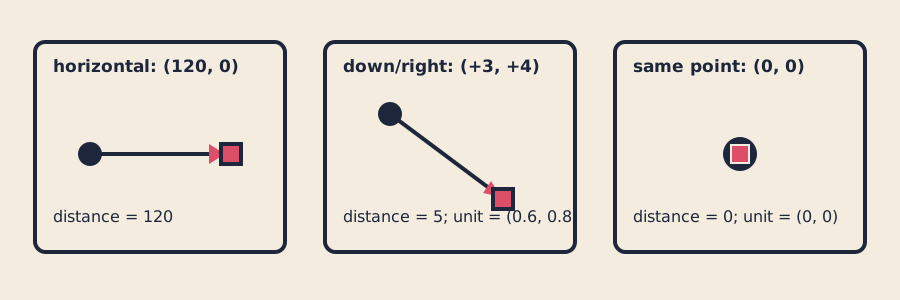
Subtraction gives direction components; length gives distance; guarded normalization gives a unit direction or zero.
Here a vector is an arrow stored as two numbers: sideways movement and
vertical movement. It is not the std::vector list from section 02.
If an anchor is at (20, 30) and a target is at (23, 34), subtract “to minus
from”:
direction = target - anchor
          = (23 - 20, 34 - 30)
          = (3, 4)
That same vector can be described three ways:
picture: an arrow right 3 and down 4
numbers: (3, 4)
code:    direction = target - anchor
Swapping the operands produces (-3, -4), the opposite arrow. In the usual
openFrameworks window, positive x points right and positive y points down.
Store and pass two components
openFrameworks includes GLM’s two-component vector :
glm::vec2 pointer{static_cast<float>(x), static_cast<float>(y)};
glm::vec2 direction = target - anchor;
The renderer-independent model uses a matching standard-library-only aggregate:
struct Vec2 { float x; float y; };
Vec2 direction{3.0f, 4.0f};
A small Vec2 is clear to pass by value. A larger read-only design uses a const
reference such as designIsValid(const Design& design), avoiding a copy while
preventing the function from changing the caller’s design. Adapter helpers copy
named x and y fields between Vec2 and glm::vec2; they never reinterpret
one unrelated struct as another.
Length turns the arrow into distance
The Pythagorean relationship measures the (3, 4) arrow:
length = sqrt(3*3 + 4*4)
       = sqrt(25)
       = 5
Distance between two points is the length of their difference:
distance(anchor, target) = length(target - anchor)
The GLM geometric functions
use the same length, distance, dot, and normalize vocabulary. The pure
course helper uses std::hypot
to avoid first storing a potentially overflowing x*x + y*y intermediate.
Normalize safely, then scale
Normalization keeps direction but changes a nonzero vector’s length to one:
unit = direction / length
(3, 4) / 5 = (0.6, 0.8)
A unit vector separates where from how far. Multiply (0.6, 0.8) by
speed 10 and the step becomes (6, 8), still pointing the same way.
The zero vector has no direction and length zero, so dividing it would be
invalid. normalizeOrZero({0,0}) deliberately returns {0,0}. Non-finite
inputs also return safe values rather than sending NaN into drawing calls.
moveToward() limits a step to the remaining distance so it cannot overshoot.
The same vector rules drive motion
MotionState keeps position, velocity, and acceleration together. One fixed
step first changes velocity by acceleration * dt, then position by
velocity * dt. A fixed dt makes replay repeatable.
The pure model uses the same building blocks for three small numerical studies:
- Seek: point toward a target, guard coincidence, and limit speed.
- Orbit: place a point at a chosen radius and phase around a center.
- Bounce: clamp a boundary crossing and reverse only the crossed velocity component.
The exercise’s visible constellation also uses these rules. Pointer input through
mouseMoved
and arrow input through
keyPressed
update the same requested target. The model clamps that target to a stroke-aware
safe inset, including at the minimum valid 64 × 64 viewport.
Practice
Practice the arithmetic and inspect a working connector before using the unit-test suite in the Exercise.
1. Calculate four arrows
Draw axes and work these out on paper:
(20,30)to(23,34)gives direction(3,4), distance5, and unit direction(0.6,0.8).(10,8)to(4,8)gives(-6,0), distance6, and unit(-1,0).(7,7)to itself gives(0,0), distance0, and guarded unit(0,0).- Unit
(0.6,0.8)scaled by reach 10 gives displacement(6,8).
Predict each answer before calculating it. If one is surprising, draw the arrow and write “to minus from” next to the subtraction.
2. Build and explore the working example
Generate and build the solution as a known-good practice app:
scripts/section-04.sh generate --project solution
scripts/section-04.sh build --project solution --configuration Release
On Windows Developer PowerShell:
.\scripts\section-04.ps1 generate -Project solution
.\scripts\section-04.ps1 build -Project solution -Configuration Release
Open the app. Move the pointer, then use each arrow key. Watch direction,
distance, and satellite spacing as the target approaches the anchor, coincides
with it, and reaches an edge. Resize to narrow, square, wide, and 64 × 64.
3. Repair a backwards connector
Temporarily change this line in
exercises/04-vectors-direction-and-distance/shared/constellation_model.cpp:
scene.direction = subtract(scene.target, scene.anchor);
to:
scene.direction = subtract(scene.anchor, scene.target);
Rebuild the solution without regenerating it. Predict what remains correct and what points backward, then inspect the app. Distance stays nonnegative, but the direction and traveler relationship reverse. Restore “target minus anchor” and rebuild.
If that was your only intended edit:
git restore -- exercises/04-vectors-direction-and-distance/shared/constellation_model.cpp
That command discards every uncommitted change in the named file.
Exercise
Problem: make a distance-reactive constellation
Build a connector whose geometry responds to pointer and arrow-key input. Choose anchor fractions, maximum reach, and a valid palette, then create a visual relationship distinct from the starter’s line-and-nodes and the solution’s triangular satellites. Preserve the public model interface, zero guard, stroke-aware inset, and equivalent pointer/keyboard routes.
Use the
Exercise 04 brief, starter, tests, and solution
as the authoritative requirements. Begin in
starter/src/design/constellation_design.cpp, then change
starter/src/ofApp.cpp after the model choices are valid.
Run the unit tests
Linux or macOS, using both compilers when available:
CXX=g++ tests/run-section-04-tests.sh
CXX=clang++ tests/run-section-04-tests.sh
Windows Developer PowerShell:
.\tests\run-section-04-tests.ps1
The tests check observable numerical contracts: vector arithmetic and
subtraction order; length, distance, and guarded normalization; fixed-step
velocity and acceleration; seek, orbit, and bounce boundaries; scaling without
overshoot; clamped target geometry; valid 64 × 64 and invalid smaller
viewports; deterministic replay; fixture values; and your design ranges. They
compile the starter design and never inspect pixels, contrast, or resemblance.
After tests pass, generate and build the starter in Debug or Release and open it at narrow, square, wide, and minimum sizes.
Quick visual check
- Anchor, target, and direction remain distinguishable without color alone.
- Pointer and arrow keys provide equivalent target movement.
- Coincident and edge targets remain finite and legible.
- Ink/background and accent/background contrast are suitable; nothing flashes.
- Geometry differs from the starter and solution in more than palette.
- Capture alt text names endpoints, direction, distance response, and viewport.
- Reused code and assets remain credited and license-compatible.
If you get stuck
For a backwards point, draw both points and write “to minus from” beside the
subtraction. For a giant or invalid number, inspect the zero-length guard before
any division. Use the (3,4,5) example as the smallest sanity check, then rerun
the first failing test.