Map, clamp, and lerp
This section turns one range into another, applies that idea to responsive layout, then asks you to build a tested poster that keeps its relationships when resized.
- Lesson: understand normalized and mapped ranges
- Practice: calculate, resize, and repair a layout
- Exercise: build a tested responsive poster
Lesson
Preserve relationships, not pixels
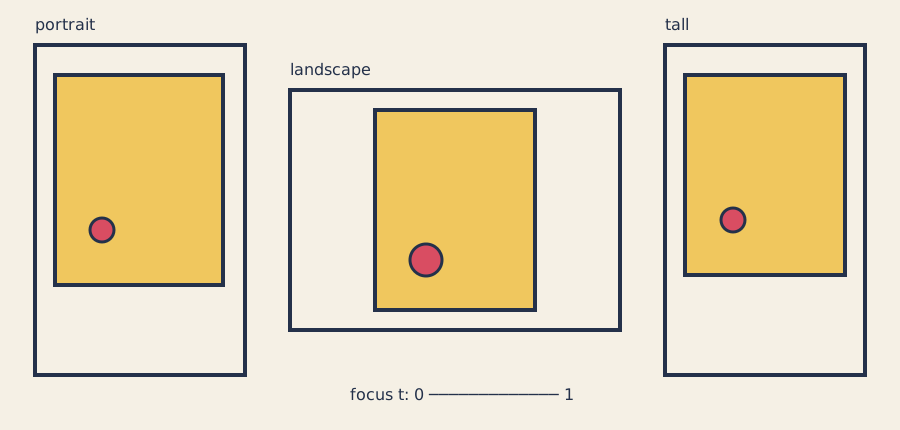
One layout rule fits a fixed-aspect poster into portrait, landscape, and tall viewports without stretching.
Mapping takes progress in one range and uses the same progress in another. A pointer at 25 on a 0-to-100 track is one quarter along; one quarter from 10 to 50 is 20.
The code uses three small ideas:
- normalize: turn a source value into progress from 0 to 1;
- lerp: use progress to move between destination endpoints; and
- clamp: stop at a documented edge instead of going beyond it.
Normalize into progress
For x between input_min and input_max:
t = (x - input_min) / (input_max - input_min)
With x=600 and source range [320, 1200]:
t = (600 - 320) / (1200 - 320)
  = 280 / 880
  = 0.3181818...
The helper requires an ascending source range. Equal or descending endpoints,
NaN, and infinity return repeatable progress zero. Valid results clamp to
[0, 1].
Lerp into the destination range
lerp(a, b, t) = a + (b - a) × t
lerp(16, 64, 0)   = 16
lerp(16, 64, 0.5) = 40
lerp(16, 64, 1)   = 64
The openFrameworks ofLerp reference
uses the same start, stop, and amount idea. The course helper stays independent
of the renderer so ordinary C++ tests can call it.
Mapping is normalize followed by lerp:
float mapClamped(float x, float in_min, float in_max,
                 float out_min, float out_max) {
    const float t = normalizeClamped(x, in_min, in_max);
    return lerpClamped(out_min, out_max, t);
}
For x=15, input [10, 20], and output [-1, 1], progress is 0.5 and the
result is zero. The openFrameworks ofMap reference
also describes source and destination ranges and optional clamping.
Clamp only documented edges
A focal control belongs to [0, 1]:
return std::clamp(value, 0.0f, 1.0f);
std::clamp
is part of
C++17. Clamping is appropriate when an endpoint is the defined safe answer. The
layout rejects viewports smaller than 64 × 64 instead of pretending a useful
poster fits there.
Fit a ratio without stretching
The poster ratio is width / height = 4 / 5 = 0.8. Try available width first:
panel_height = available_width / 0.8
If that is too tall, height is limiting:
panel_height = available_height
panel_width  = panel_height × 0.8
At 320 × 400, 16-pixel padding leaves 288 × 368. The fitted panel is
288 × 360 at (16, 20). Unused space changes sides while the ratio remains
0.8.
Shape progress with one easing curve
Smoothstep changes the pace of progress without changing its range:
smoothstep(t) = t²(3 - 2t), for t clamped to [0, 1]
It keeps endpoints 0 and 1, keeps midpoint 0.5, and remains monotonic, but starts and ends gently. The easing reference gallery shows the visual difference. This sketch uses smoothstep for headline size and focal radius while padding remains linear.
Keep calculations outside drawing
shared/poster_layout.cpp returns plain rectangles and points.
ofApp::windowResized() rebuilds them, and draw() renders them. That separation
makes the numerical relationships testable without pixels.
Calculated decimals are approximate because C++ float has finite precision,
as described by the fundamental-types reference
.
The fixture comparison uses the larger of an absolute and relative tolerance.
Choose tolerances from the behavior’s scale, not simply to make failures vanish.
Practice
Practice is guided and has no unit-test gate. Calculate one mapping, explore a working resize, and repair one aspect-ratio mistake by looking at the picture.
1. Work a complete mapping
Calculate these in order:
- Normalize
760from[320, 1200]: progress is0.5. - Lerp padding from
[16, 64]: padding is40. - Evaluate smoothstep at
0.5: the result remains0.5. - Fit a 4:5 panel in
500 × 500after 40-pixel padding: available space is420 × 420, so the panel is336 × 420and begins atx=82.
Sketch the rectangles before opening the app. Connect each number to one visible relationship.
2. Build and resize the starter
scripts/section-03.sh generate --project starter
scripts/section-03.sh build --project starter --configuration Release
Windows Developer PowerShell:
.\scripts\section-03.ps1 generate -Project starter
.\scripts\section-03.ps1 build -Project starter -Configuration Release
Open the app at portrait, square, and landscape sizes. Predict whether width or height limits the panel before each resize, then check the result.
3. Repair a stretched panel
In exercises/03-map-clamp-and-lerp/shared/poster_layout.cpp, temporarily change:
panel_width = panel_height * poster_aspect;
to:
panel_width = panel_height / poster_aspect;
Rebuild and inspect the visibly wrong ratio. Connect the stretch to the width/height equation, restore multiplication, and rebuild. If this was your only intended edit:
git restore -- exercises/03-map-clamp-and-lerp/shared/poster_layout.cpp
That command discards every uncommitted change in the named file.
Exercise
Problem: create a responsive poster
Choose focus, vertical bias, and palette, then create your own hierarchy and responsive geometry. The starter uses a filled panel, focal dot, and rule; the solution uses an outline, nested orbit circles, triangle, and negative space. Make a third composition whose geometry or mapping—not only palette—differs.
The Exercise 03 responsive-poster brief is authoritative for editable files, ranges, minimum viewport, fixtures, and the explained solution. Keep the public layout interface unchanged.
Run the unit tests
Linux or macOS, with both compilers when available:
CXX=g++ tests/run-section-03-tests.sh
CXX=clang++ tests/run-section-03-tests.sh
Windows Developer PowerShell:
.\tests\run-section-03-tests.ps1
Tests cover normalize/lerp endpoints and midpoint, out-of-range clamping,
invalid source ranges, non-finite input, monotonic smoothstep, focus endpoints,
resize, 4:5 aspect, finite in-bounds geometry, the valid 64 × 64 boundary,
invalid smaller viewports, repeatable replay, and design ranges. They inspect
state rather than pixels, contrast, source style, or resemblance.
After tests pass, build and open the starter in Debug and Release at portrait, square, landscape, and minimum useful sizes.
Quick visual check
- Hierarchy remains legible at every required size.
- Shape, spacing, outline, or labels communicate structure without color.
- Contrast is suitable and nothing flashes.
- Resizing neither crops focal geometry nor stretches the 4:5 panel.
- Geometry or mapping differs from the starter and solution.
- Capture alt text names panel aspect, focus, hierarchy, and viewport relation.
If you get stuck
Write a tiny table with “input → progress → output.” Check source and destination
endpoints before changing code, then decide whether clamping is part of the
contract. If the panel stretches, write width / height = 0.8 beside the
calculation and solve for the missing dimension.