Interlude — reading and writing the first C++ test
A test is a small causal story. First learn how that story reaches the terminal, then practice reading its values, then write one tested known case.
- Lesson: understand arrange, act, and assert
- Practice: trace a result and compare decimals
- Exercise: repair and write a C++ test
Lesson
One small question at a time
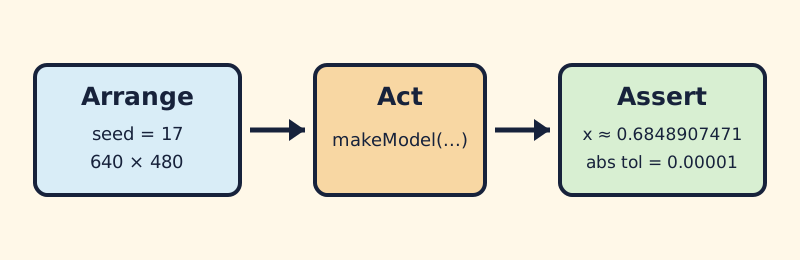
A useful test separates fixed inputs, one action, and one answer you can check.
Most course tests follow three ordinary steps:
- Arrange: choose fixed input values.
- Act: call one behavior.
- Assert: compare the answer with what you expected.
A fixture is a saved test example: fixed inputs and, when useful, reviewed expected answers. Keep each question small enough that a failure points toward one behavior.
How failure reaches the shell
The practical path is short:
- the test counts failures;
- it asks the app to exit with that count;
- the main loop returns the count; and
main()returns it to the shell.
Zero means all checks passed. A number above zero means something failed. A test program can compile successfully and still fail when it runs.
The course uses openFrameworks'
ofxUnitTests
with an
ofAppNoWindow
target. The pinned
ofAppRunner.cpp
and
ofMainLoop.cpp
show how the status returns to main().
That is why this final line matters:
return ofRunMainLoop();
Calling ofRunMainLoop(); and then returning zero would hide a red suite from
automation.
What belongs in a test program
The compiler handles each .cpp file, then the linker joins them into one
program. A header is included by a .cpp file; it is not a separate compiled
piece.
| Test program | Course sources | Starts at |
|---|---|---|
| Small starter | shared/core/course_probe.cpp; starter known case; shared test |
test runner main() |
| Small solution | shared/core/course_probe.cpp; solution known case; shared test |
same runner main() |
| openFrameworks no-window | foundation unit sources; course probe; generated OF/ofxUnitTests sources | foundation/unit/src/main.cpp |
The windowed app stays out: it would add a second main() and drawing callbacks
the number test does not need.
Arrange, act, assert in C++
// Arrange
const std::uint32_t seed = 17U;
const course::Viewport viewport{640.0f, 480.0f};
const float expectedX = 0.6848907471f;

// Act
const course::Model actual = course::makeModel(seed, viewport);

// Assert
const auto near = course::test::expectNear(actual.position.x, expectedX,
                                           1e-5, 1e-6);
ofxTest(near.passed, "known seed produces reviewed x", near.message);
Work out the expected answer independently. Asking the same function for both actual and expected values lets one mistake agree with itself.
Decimal answers need a little room
Binary floating-point cannot represent every decimal exactly; the formal details
are in the C++ floating-point reference
.
If actual is 0.684891 and expected is 0.684890, the difference is
0.000001. A tolerance of 0.00001 accepts that small rounding difference.
The helper uses whichever allowance is larger:
absTol: a fixed allowance, useful near zero;relTol: an allowance that grows with the expected magnitude.
Choose tolerance from the behavior’s required precision, not merely to silence a failure. Whole counts can still use exact equality.
What headless tests cannot judge
A no-window test can check calculations, boundaries, reset, and failure messages.
It cannot see draw() or decide whether an image is readable, original, or
accessible. Use number tests for deterministic behavior and your eyes for the
picture.
Practice
Practice is guided and has no unit-test gate. Trace one exit status and one comparison before editing the exercise.
1. Trace pass and failure
Read the final return ofRunMainLoop(); in foundation/unit/src/main.cpp.
Write down what the shell receives when the failure count is zero and when it is
two. Then explain why adding return 0; afterward would report success even
when assertions failed.
2. Label one test story
In the known-case snippet above, identify:
- the fixed seed and viewport;
- the one function call;
- the independently reviewed expected value; and
- the comparison and its diagnostic label.
Change the seed only on paper and list which expected values would need new independent review. Do not copy values from the function under test.
3. Check a tolerance by hand
For actual 1000.003, expected 1000.000, absolute tolerance 0.001, and
relative tolerance 0.00001, calculate:
absolute allowance = 0.001
relative allowance = 0.00001 × 1000 = 0.01
used allowance     = 0.01
observed difference = 0.003
The comparison passes because 0.003 <= 0.01. Repeat with actual 1000.02 and
predict the result before calculating.
Exercise
Problem: repair and author one known case
First repair one deliberately wrong foundation assertion. Then choose your own fixed seed and ordinary positive viewport, record one repeatable model result, and turn those independently reviewed numbers into a focused known-case test.
The
First C++ test exercise brief
is authoritative for the editable file, temporary print statement, expected
value slots, and explained solution. Edit only
starter/learner_known_case.cpp for your authored case.
Repair the supplied assertion
In foundation/unit/src/main.cpp, temporarily change:
first.position.x >= 0.0f
to:
first.position.x < 0.0f
Build and run the Release unit executable. Read the named failure and nonzero
result, restore >= 0.0f, and require 12/12 tests passed. If this was your
only intended foundation edit:
git restore -- foundation/unit/src/main.cpp
That command discards every uncommitted change in the named file.
Write and run your known case
Follow the brief to print one result, review it, save the four expected numbers, and remove the temporary print. The runner checks your test against the real model and a deliberately wrong model.
Linux or macOS, with both compilers when available:
CXX=g++ tests/run-first-cpp-test.sh starter
CXX=clang++ tests/run-first-cpp-test.sh starter
Windows Developer PowerShell:
.\tests\run-first-cpp-test.ps1 -Variant starter
To run the native no-window suite after setting OF_ROOT:
scripts/foundation.sh generate --project unit
scripts/foundation.sh build --project unit --configuration Release
scripts/foundation.sh test --project unit --configuration Release
Windows Developer PowerShell:
.\scripts\foundation.ps1 generate -Project unit
.\scripts\foundation.ps1 build -Project unit -Configuration Release
.\scripts\foundation.ps1 test -Project unit -Configuration Release
The final result must show that the real model matches your reviewed values within tolerance and the wrong model fails with actual and expected numbers. The three-platform build notes describe the checked Linux, macOS, and Windows setups.
Quick visual check
There is no rendered picture in this interlude. Confirm that the failure message names the differing value and the final run is green. If you save a terminal capture, its alt text should name the failed check and useful numbers rather than only “test failure.”
If you get stuck
Return to arrange → act → assert. Write down the one answer you expect before running anything, then read actual and expected values in the first failure. Change one input or assertion at a time; a failed assertion is a clue, not a verdict.