The Python-to-C++ survival kit
This section follows one collection from a function call to a visible family of marks, then asks you to build your own tested family.
- Lesson: read functions and owned collections
- Practice: build, inspect, and repair a family
- Exercise: design a tested mark family
Lesson
One rule can make a family
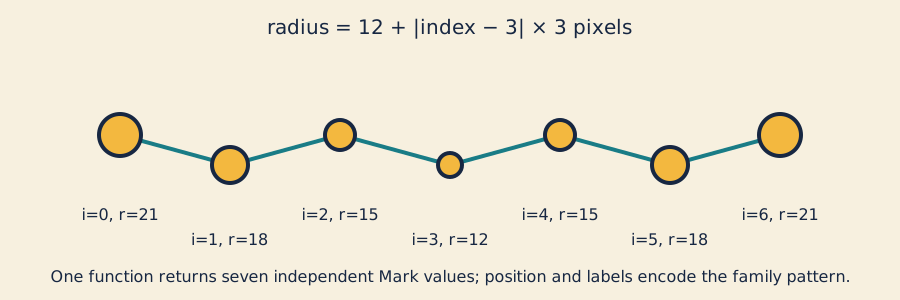
Index labels, position, and size show one parameter rule producing a family without relying on color.
The sketch needs one function that calculates several related marks and returns
the whole collection. In C++, std::vector is a list that can grow, but every
element has one declared type.
Read this signature from left to right:
std::vector<Mark> makeMarkFamily(const Design& design, Viewport viewport);
The C++ functions reference is dense, so ask four practical questions:
- What comes back? A
std::vector<Mark>value. - What goes in? A design followed by a viewport.
- What may change?
constpromises not to change the design through this name. - What does
&mean? The parameter refers to the caller’s existing design.
A value parameter such as Viewport viewport is a local copy. A
const reference
avoids copying the design while forbidding changes through that reference. The
returned vector has no &, so the caller owns it after the function returns.
The small Python bridge
If you know Python, these functions express the same radius rule:
def radius_for(base, step, centered_index):
    return base + abs(centered_index) * step
float radiusFor(float base, float step, float centered_index) {
    return base + std::fabs(centered_index) * step;
}
C++ states parameter and return types before the body runs. This comparison is a reading aid; Python is not required for the course.
Build and read a vector
A std::vector<Mark>
is a growable collection that owns its Mark values:
std::vector<Mark> marks;
marks.reserve(count);       // prepare capacity; size remains zero
marks.push_back(next_mark); // append one value; size grows by one
return marks;
reserve(7) prepares storage without creating elements. resize(7) creates
seven elements immediately. That distinction matters in Practice.
An indexed loop supplies a number for formulas:
for (int index = 0; index < design.count; ++index) {
    // calculate one Mark using index, then push_back it
}
A range-based loop reads each existing value clearly:
for (const Mark& mark : marks) {
    drawMark(mark);
}
Use an indexed loop when the numeric index matters; use a range loop when each element is enough.
Scope and ownership
A local name’s scope ends at its closing brace. A returned vector carries its owned elements to the caller, while a reference is only an alias. Keeping a reference after its object dies creates a dangling reference; the full rules are in the object-lifetime reference .
The new expression
requires an explicit ownership and release policy. This course defers raw
new/delete; std::vector already owns the collection safely.
Turn an index into a radius
The preview uses count 7, center index 3, base radius 12, and step 3:
indices:     0   1   2   3   4   5   6
distance:    3   2   1   0   1   2   3
radius px:  21  18  15  12  15  18  21
At index 1:
12 + |1 - 3| × 3 = 18 pixels
The same formula builds every mark. Changing count, spacing, base radius, or step produces a related family instead of unrelated drawing calls. Invalid designs or viewports return an empty vector, which is a clear result a caller can handle.
Practice
Practice is guided and has no unit-test gate. You will inspect one returned collection, run a working sketch, and repair a capacity-versus-size mistake.
1. Predict a returned collection
std::vector<float> twoRadii(float first, float second) {
    return {first, second};
}

const std::vector<float> radii = twoRadii(8.0f, 13.0f);
Predict radii.size() and whether its values remain usable after twoRadii
returns. The answers are two and yes: the caller owns the returned vector.
Now predict the size when a loop calls push_back once for each index from 0
through 6. It is seven.
2. Build and inspect the working family
Read
mark_family.h
and trace one mark through
mark_family.cpp
.
Then generate, build, and open the starter:
scripts/section-02.sh generate --project starter
scripts/section-02.sh build --project starter --configuration Release
On Windows Developer PowerShell:
.\scripts\section-02.ps1 generate -Project starter
.\scripts\section-02.ps1 build -Project starter -Configuration Release
Resize the window. Identify where the indexed loop calculates values and where the range loop draws them.
3. Repair reserve versus resize
In exercises/02-python-to-cpp-survival-kit/shared/mark_family.cpp, temporarily
change:
marks.reserve(static_cast<std::size_t>(design.count));
to:
marks.resize(static_cast<std::size_t>(design.count));
Predict why seven requested marks become fourteen: resize creates seven, then
the loop appends seven more. Rebuild and inspect the extra marks, then restore
reserve and rebuild. If this was your only intended edit:
git restore -- exercises/02-python-to-cpp-survival-kit/shared/mark_family.cpp
That command discards every uncommitted change in the named file.
Exercise
Problem: create a visual family
Choose count, center, spacing, base radius, radius step, and colors, then render a family whose members visibly belong together. The starter uses circles with vertical ticks; the solution uses linked hourglasses. Make a third treatment with geometry or mapping—not only color—that remains legible without color.
The
Exercise 02 family brief
is authoritative for editable files, ranges, controls, fixtures, and the
explained solution. Keep makeMarkFamily and its public types unchanged.
Run the unit tests
Linux or macOS, with both compilers when available:
CXX=g++ tests/run-section-02-tests.sh
CXX=clang++ tests/run-section-02-tests.sh
Windows Developer PowerShell:
.\tests\run-section-02-tests.ps1
The fixtures cover wide, narrow, and large families. Boundary cases include
1xN, Nx1, and 1x1 viewports returning empty. Properties check collection
size, finite in-bounds values, repeatable construction, known first/middle/last
values, and one-at-a-time design changes. Tests compile the starter design and
inspect state, not source style, pixels, contrast, or originality.
After tests pass, generate and build the starter in Debug and Release, then open it at narrow and wide sizes.
Quick visual check
- Every mark remains legible after resizing.
- Shape, stroke, placement, or labels communicate the family without color.
- Contrast is suitable and nothing flashes.
- Geometry or mapping differs from the preview, starter, and solution.
- Capture alt text names count, silhouette, size pattern, and relationship.
- The code returns owned values, uses short-lived const references, and adds no
raw
new/delete.
If you get stuck
Read the first compiler or test failure and compare the function declaration with its call site. If the vector size is surprising, ask whether you meant to reserve capacity or resize the collection. Make one repair you can explain, then rerun the smallest relevant command.