A mark that moves
This section follows the same three-step path: learn how motion is represented, practice the calculation and callbacks, then solve one tested traveler problem.
- Lesson: understand state and time
- Practice: calculate, trace, and repair
- Exercise: complete the tested traveler
Lesson
Motion is remembered position
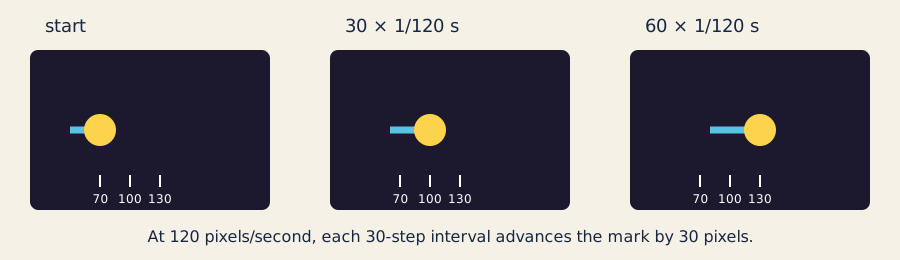
At 120 pixels per second, each 30-step interval advances the mark by 30 pixels; position and ticks communicate the change without relying on color.
Animation is a series of still pictures. A program remembers a position, changes it a little, and draws the next frame. The remembered values are state; a change to them is an update.
Suppose x begins at 100 and the mark moves at 120 pixels per second. One
update represents 1/60 second:
120 pixels/second × 1/60 second = 2 pixels
100 pixels + 2 pixels = 102 pixels
The reusable rule is:
next position = current position + velocity × elapsed seconds
Code often calls elapsed time dt. Seconds cancel seconds, leaving pixels.
Variables hold the state
A variable has a type, a name, and a value:
float x = 100.0f;       // fractional pixels
float speed = 120.0f;   // pixels per second
int pointer_x = 320;    // a whole pixel from an input callback
bool paused = false;    // yes or no
float suits positions, rates, and elapsed seconds. int suits whole pointer
coordinates. bool records a two-way mode. The
C++ fundamental-types reference
has the formal details; these are the only types you need here.
Callbacks divide the work
The openFrameworks events documentation defines when callbacks run:
setup()creates the initial state once.update()changes state; it does not draw.draw()reads state and draws; it does not advance time.- pointer and keyboard callbacks update input state.
The small layer that receives framework events and passes ordinary values to the model is an adapter. Keeping calculations outside the adapter lets tests run without a graphics window.
Why the model uses fixed steps
The adapter gets the previous frame duration in seconds from
ofGetLastFrameTime()
.
It never multiplies that value by 1000.
A direct variable-step update is simple:
position += velocity * frame_seconds;
But steering and boundary decisions can differ when the same time is divided into differently sized frames. The exercise uses the accumulator technique from Fix Your Timestep! :
frame = clamp(valid_seconds, 0, 0.1)
accumulator += frame
while accumulator >= 1/120:
    simulate exactly 1/120 second
    accumulator -= 1/120
A remainder waits for the next frame. Zero, negative, NaN, and infinite frame
durations do not move the mark. Returning after a long pause advances at most
0.1 second, preventing a huge catch-up jump.
Input, wrap, and reduced motion
At each step, the pointer direction is target - position. Before a pointer
event, arrow keys provide a fallback direction. The model normalizes that
direction and applies the chosen speed.
The mark’s center may leave by one radius so it disappears fully, then wraps to
the opposite outer edge while preserving overshoot. Space toggles pause, R
resets the repeatable motion state, and M uses one-quarter speed. Reset keeps
the reduced-motion preference.
Practice
Practice is guided and has no unit-test gate. Work through one calculation, trace the callbacks, run the app, and repair one unit mistake.
1. Calculate one update by hand
Start with:
float x = 100.0f;
const float speed = 120.0f;
const float dt = 1.0f / 60.0f;
x = x + speed * dt;
Before checking the answer, calculate speed * dt. The new x is 102.0f.
Now imagine dt were 16.67 milliseconds mistakenly treated as seconds: the
same expression would request roughly 2000 pixels of movement. Types cannot
catch a wrong unit when both values are float.
2. Trace a fixed-step frame
Read advanceFrame(...) in
traveler_model.cpp
.
Follow a frame duration of 1/30 second through the accumulator. It becomes
four updates of 1/120 second. At 120 pixels per second, each update moves one
pixel, for four pixels total.
Next trace a frame duration of 1/240 second. It is half a fixed step, so the
first frame moves zero pixels and keeps the remainder. A second 1/240 frame
completes one step and moves one pixel.
3. Build and explore the working example
Use the supplied solution as a known-good practice app. You are only exploring its controls here; the Exercise will start from the incomplete starter.
scripts/section-01.sh generate --project solution
scripts/section-01.sh build --project solution --configuration Release
On Windows Developer PowerShell:
.\scripts\section-01.ps1 generate -Project solution
.\scripts\section-01.ps1 build -Project solution -Configuration Release
Open the app. Try pointer steering, every arrow key, Space, R, and M. Resize
the window and watch the wrap at all four edges.
4. Repair a seconds-versus-milliseconds bug
In exercises/01-a-mark-that-moves/solution/src/ofApp.cpp, temporarily change:
ofGetLastFrameTime()
to:
ofGetLastFrameTime() * 1000.0f
The code still compiles. Predict the symptom, run it briefly, and notice how the
0.1-second clamp limits—but does not hide—the mistake. Remove * 1000.0f and
rebuild. Do not regenerate because no source file was added or removed.
If this was your only intended edit, restore it with:
git restore -- exercises/01-a-mark-that-moves/solution/src/ofApp.cpp
That command discards every uncommitted change in the named file.
Exercise
Problem: complete a wraparound traveler
Implement the missing stepDistance(rate, elapsed_seconds) calculation, then
choose a normalized start, speed, radius, and three colors. The mark must move
toward pointer input, support arrow-key fallback, wrap with overshoot, pause
without a resume jump, reset repeatably, and retain reduced-motion mode through
reset.
The starter is intentionally incomplete: the TODO calculation and design
values make its tests fail. Open the
Exercise 01 brief, starter, tests, and solution
,
then edit starter/src/design/traveler_design.cpp. Keep the public model and
function names unchanged. After the model passes, change the silhouette or trail
in starter/src/ofApp.cpp; tests inspect state, not pixels.
Run the unit tests
Linux or macOS:
tests/run-section-01-tests.sh
Windows Developer PowerShell:
.\tests\run-section-01-tests.ps1
The tests check attributes that demonstrate the model rules:
stepDistancemultiplies signed rate by elapsed seconds;- one fixed step moves by the expected distance;
- equal elapsed-time partitions produce the same fixed-step result;
- invalid durations, pause, and the 0.1-second clamp behave safely;
- all four wrap boundaries preserve a finite state;
- reset reproduces the chosen start and preserves reduced motion; and
- chosen speed, radius, normalized start, and RGB values are valid.
Once the tests pass, generate, build, and open the starter again. A green model suite cannot decide whether motion, contrast, or controls are visually clear.
Quick visual check
- Pointer and arrow input each have an immediately legible effect.
- Space pauses without a resume jump;
Rrepeats the start. Mis visibly slower and remains enabled after reset.- Wrap is clean on every edge at narrow and wide window sizes.
- A line, silhouette, or placement communicates direction without color alone.
- The result differs from the starter and solution in more than its palette.
- No flashing or rapid full-field changes occur.
If you get stuck
Start with stepDistance: at 120 pixels per second and 1/60 second, the answer
must be 2 pixels. Then run the tests again and address the first failure only.
If the app jumps or vanishes after tests pass, inspect position, speed, and dt
one at a time. Check the units before changing the accumulator.