Oscillation, circles, and phase
This section introduces sine, cosine, radians, and phase from the beginning. A circle picture and four quarter-turns will do most of the explanatory work.
- Lesson: use a circle as a motion calculator
- Practice: calculate, run, and repair
- Exercise: build a tested phase field
Lesson
A circle becomes a motion tool
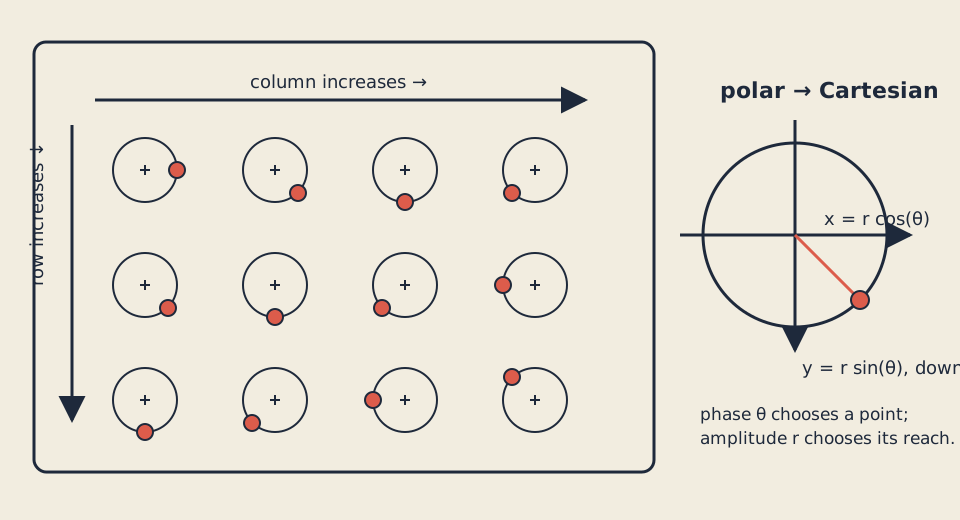
Nested rows and columns repeat one circular rule while phase offsets create a traveling rhythm.
An angle says where a point sits around a circle. Cosine supplies its horizontal share; sine supplies its vertical share. You do not need a trig table. Begin with right, bottom, left, and top, then let the computer calculate positions between them.
A full turn is 360 degrees or 2*pi radians. The code names that full-turn
amount tau:
constexpr float pi = 3.14159265358979323846f;
constexpr float tau = 2.0f * pi;
constexpr float fixed_dt = 1.0f / 60.0f;
Degrees and radians are two labels for the same turn:
radians = degrees * pi / 180
degrees = radians * 180 / pi
Thus 90 degrees is pi/2, 180 degrees is pi, and 360 degrees is tau.
The conversion helpers return zero for NaN or infinite input instead of
passing invalid values into geometry.
Cosine controls x; sine controls y
At the four quarter-turns:
| Angle | cos(angle) |
sin(angle) |
Screen position |
|---|---|---|---|
0 |
1 |
0 |
right |
pi/2 |
0 |
1 |
down |
pi |
-1 |
0 |
left |
3*pi/2 |
0 |
-1 |
up |
For a circle of radius r:
x offset = r * cos(angle)
y offset = r * sin(angle)
Add those offsets to the center. The C++ functions
std::sin and std::cos
fill in the points between quarter-turns and expect radians. A result that should
be zero may be a tiny value such as -0.00000004; tests therefore compare
calculated decimals with a small tolerance.
Cartesian and polar descriptions
Ordinary (x,y) values are Cartesian coordinates. A circle is often easier
to describe with polar coordinates: (radius, angle).
struct Polar { float radius; float angle_radians; };
Vec2 offset = polarToCartesian({radius, angle});
To reverse the conversion, hypot(x,y) measures radius and
std::atan2
finds the angle while respecting all four quadrants. The zero vector has radius
zero but no meaningful direction, so the explicit course rule is
cartesianToPolar({0,0}) == {0,0}.
Amplitude, frequency, period, and phase
One-axis oscillation follows:
value = amplitude * sin(tau * frequency * time + phase)
The names describe visible parts of the motion:
- Amplitude is the farthest distance from the center.
- Frequency is the number of cycles per second.
- Period is seconds per cycle:
period = 1 / frequency. - Phase is the starting place within the cycle.
For amplitude 7 and frequency 2, one cycle takes 1/2 = 0.5 seconds.
After one full period—or after adding tau to phase—the value repeats.
Phase offsets turn repetition into a wave
Nested loops give every row and column one mark:
for (int row = 0; row < rows; ++row) {
    for (int column = 0; column < columns; ++column) {
        int index = row * columns + column;
    }
}
A 3-by-4 field has 12 marks. Row 1, column 2 has index 6. Each mark receives:
phase = tau * frequency * time
      + row * row_phase_step
      + column * column_phase_step
Every mark follows the same circle rule, while row and column offsets create a
traveling rhythm. The adapter advances explicit fixed time, while Space or P
pauses and R resets through
keyPressed
.
The pure model never reads a clock, so identical inputs replay identically.
Visible bounds include amplitude, mark radius, half the stroke, and an outer
margin. The model remains finite at 64 × 64 and marks a smaller viewport or
invalid design as invalid rather than emitting broken coordinates.
Practice
Use the circle table and ordinary algebra before working with the full field. The unit-test suite stays in the Exercise.
1. Work six small cases
- Convert 90 degrees:
90*pi/180 = pi/2radians. - Convert
piradians:pi*180/pi = 180degrees. - Radius 10 at
pi/2gives offset approximately(0,10). - Point
(-3,4)has radius 5;atan2places it in quadrant two. - Frequency 0.5 cycles/second has period
1/0.5 = 2seconds. - A 5-by-7 field has 35 marks; row 3, column 2 has index 23.
Sketch the circle and grid first, predict each answer, then calculate it.
2. Build and inspect the working example
scripts/section-05.sh generate --project solution
scripts/section-05.sh build --project solution --configuration Release
On Windows Developer PowerShell:
.\scripts\section-05.ps1 generate -Project solution
.\scripts\section-05.ps1 build -Project solution -Configuration Release
Open the app. Pause on each quarter-turn, resume, reset, and watch one complete
period. Resize it to 64 × 64, narrow, square, and wide. Identify which visual
change comes from time and which comes from row or column phase.
3. Repair a broken circle
In
exercises/05-oscillation-circles-and-phase/shared/phase_field_model.cpp,
temporarily replace the y calculation:
polar.radius * std::sin(polar.angle_radians)
with:
polar.radius * std::cos(polar.angle_radians)
Rebuild the solution without regenerating it. Predict the four quarter-turn positions, inspect the distorted path, then restore sine for y and rebuild.
If that was your only intended edit:
git restore -- exercises/05-oscillation-circles-and-phase/shared/phase_field_model.cpp
That command discards every uncommitted change in the named file.
Exercise
Problem: create a repeated phase-driven field
Build a responsive row-and-column field whose marks follow circular motion with repeatable phase offsets. Choose valid rows, columns, amplitude, frequency, phase steps, mark radius, and palette. Then create geometry distinct from the starter’s orbit circles and the solution’s connected diamonds while preserving pause, reset, fixed-time, public model, and bounds rules.
Use the
Exercise 05 brief, starter, tests, and solution
as the authoritative contract. Begin in
starter/src/design/phase_field_design.cpp, then edit starter/src/ofApp.cpp.
Run the unit tests
Linux or macOS, with both available compilers:
CXX=g++ tests/run-section-05-tests.sh
CXX=clang++ tests/run-section-05-tests.sh
Windows Developer PowerShell:
.\tests\run-section-05-tests.ps1
The tests check degree/radian conversions, four cardinal positions,
polar/Cartesian round trips, all atan2 quadrants and the zero rule, amplitude,
frequency, period, nested indexing and count, phase and time periodicity,
finite stroke-aware bounds at 64 × 64, invalid smaller viewports,
determinism, fixture values, and your design ranges. They compile the starter
design and never judge pixels, contrast, or originality.
After tests pass, generate and build the starter. Open it at minimum, narrow, square, and wide sizes and observe a complete period.
Quick visual check
- Pause, resume, and reset work by keyboard; no pattern flashes.
- Mark roles and phase relationships remain understandable without color alone.
- Ink/background and accent/background contrast are suitable.
- Geometry remains legible from
64 × 64through wide layouts. - Shape or spatial behavior differs from starter and solution, not only palette.
- Capture alt text names the grid, phase direction, shape encoding, and viewport.
- Reused code and assets remain credited and license-compatible.
If you get stuck
Return to one quarter-turn before debugging a whole field. Check that cosine controls x, sine controls y, and the angle is in radians. If a value is almost zero, use the approximate comparison rather than demanding exact binary decimal storage. Then rerun the first failing test.