Original visual-instrument capstone
The mission
Create one visual instrument: a sketch you can play through controls, live input, recorded input, or some combination of them. A control should cause a visible change that a new player can discover. The project should feel like one idea, not three unrelated demos sharing a window.
Use at least three ideas from sections 03–17. Choose exactly one to explore more deeply. For example, you might try a new mapping, compare two ways of updating motion, improve a sampling method, or measure a real speed-versus-detail tradeoff. Use the other two ideas in ways you already understand. This limit is a kindness: it keeps the project possible to finish.
Keep the instrument dependable while you work:
- make its main behavior replayable from saved input; if a live signal cannot be saved, send a bundled test case through the same input-cleanup path;
- keep resize and reset working;
- show a useful fallback when an asset, file, or optional device is missing;
- reject broken replay data without damaging the last good state; and
- keep a slow display frame from causing a huge burst of catch-up work.
Keep the source, build command, controls, and credits together. Add a representative image or other notes when they will help you return to the project. A larger publication package is optional and appears near the end of this lesson.
The optional one-page plan can help if the project feels too large. A few notes about the three ideas, deeper question, controls, limits, and fallback are enough.
Start from one working study
Create a capstone branch after finishing section 18. Pick the one study whose
calculations are closest to the idea you want to explore. Grow that one starter into
the capstone. Do not try to merge three ofApp files or three sets of generated
project files. Keep using the chosen section’s familiar build wrapper and its tested
model/design declarations.
Before changing the study, rerun its test, generation, build, and launch commands from
the section 18 bootstrap
.
If they pass, you have a safe place to return to. Keep using that exercise’s existing
model header/source pair and fixtures/ directory; the wrapper deliberately rejects
extra source files. Add your capstone checks to the existing no-window test and platform
runners so one familiar command still runs the old and new checks. Leave generated
Xcode, Visual Studio, and Make files out of the repository.
The old starter gives you working build plumbing, not the capstone idea. Build one connected use of three ideas, explore one of them more deeply, and make structural choices of your own. A few rough alternatives can help; save only the ones that teach you something useful. If none of your studies has calculations you can honestly extend, treat that as useful feedback rather than inventing a new project layout.
No single right answer
The diagrams below are unfinished process slices, not final compositions, starter layouts, or quality targets. They omit palette resolution, complete controls, and publication polish on purpose.
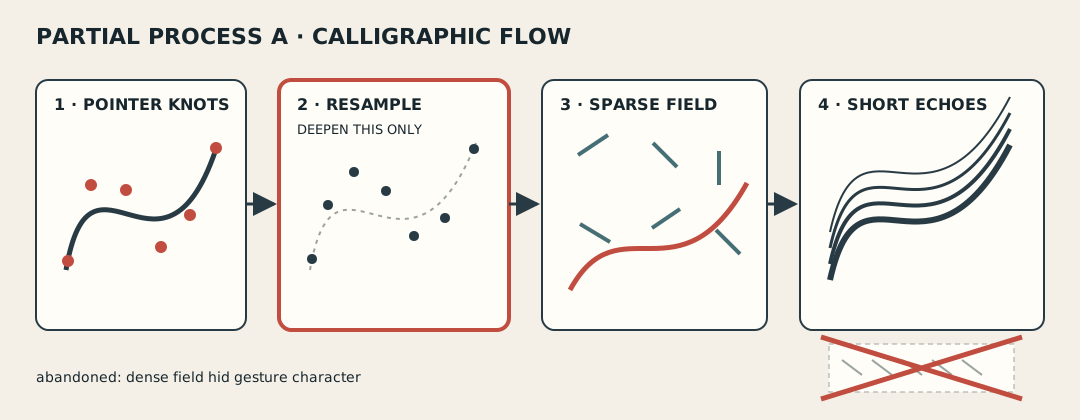
Unfinished direction A combines gesture, flow, and recent history. It explores gesture resampling; the crossed-out dense field shows an idea that was dropped.
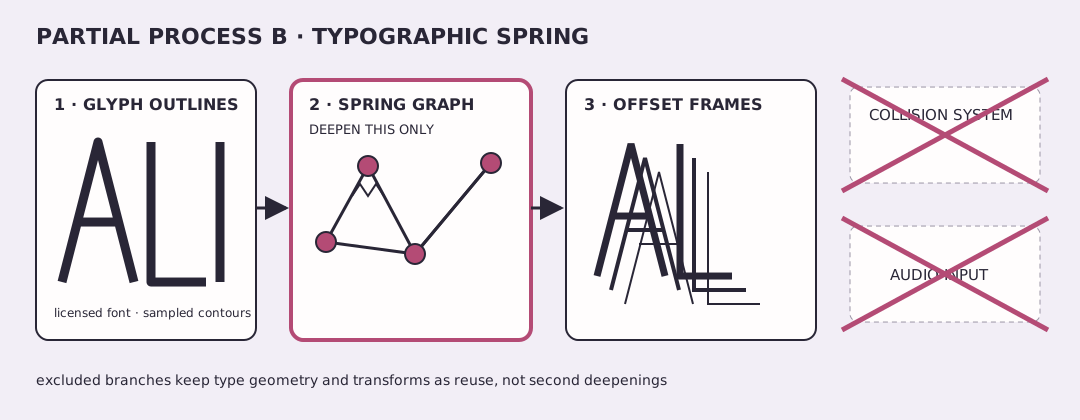
Unfinished direction B combines letter shapes, springs, and transforms. It explores spring response while deliberately leaving out collision and audio.
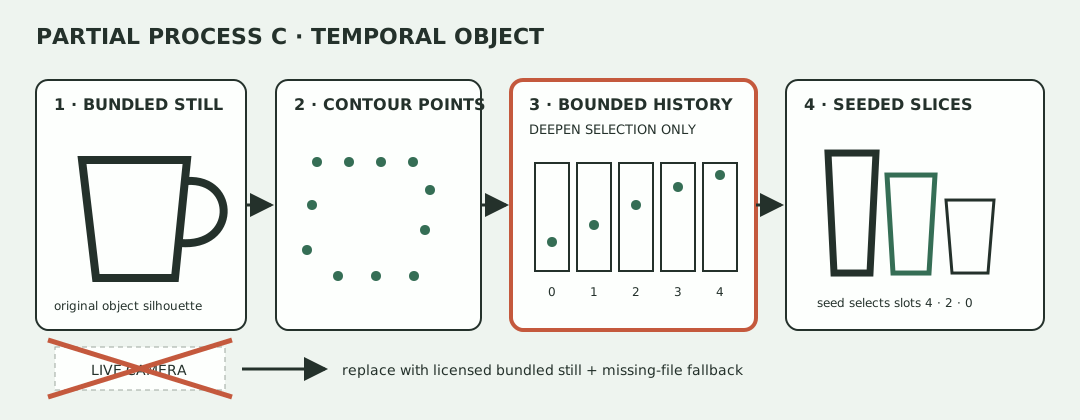
Unfinished direction C combines sampled image points, recent history, and seeded chance. It explores history selection and deliberately uses a still image instead of a live camera.
These unfinished examples differ in source material, shapes, density, input, mapping, and use of time. Borrow their working habits—try one small risky idea, write down an approach you reject, and test one calculation—not their layouts. There is no official finished answer to copy.
Keep the moving parts understandable
Use four explicit boundaries, even if each is only a few functions:
live or recorded controls -> input cleanup -> model -> shape data -> drawing
                                      ^          |
                                      |-- reset -|
Both live and recorded controls enter through the same cleanup step. The model then receives those 0-to-1 control values, a fixed time step, settings, and a seed. It does not secretly read the clock, window, device, files, or a different random generator. Drawing code receives finished shape positions and must not change the model behind the scenes.
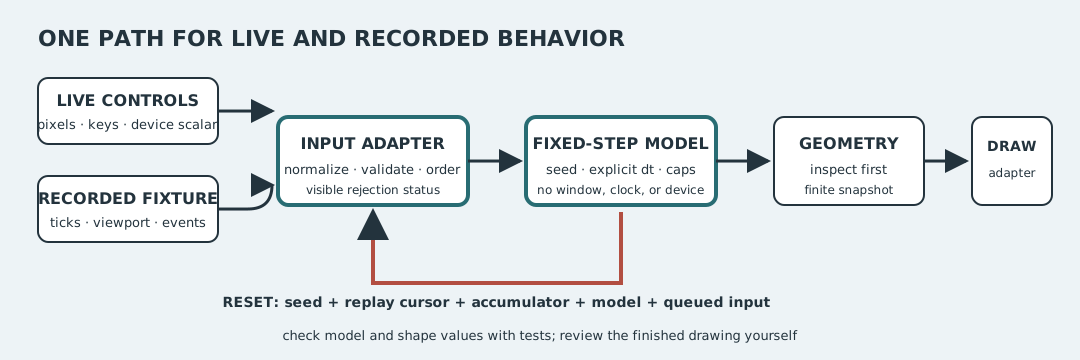
Clean up input once, update in fixed time steps, check the shape data before drawing, and make reset return to the recorded beginning.
Use replay-events.tsv
to test the shared input cleanup
step. Then add one saved test case for your project and keep the result with your code. Running the same seed, settings,
window events, input order, and fixed time steps twice must produce the same saved
model/shape answers within your stated comparison tolerance. Check those meaningful
numbers rather than fragile screenshot bytes.
Go deeper in one place
If it helps you keep scope under control, jot down this small table:
| Role | Earlier idea | What you are reusing | What you will save |
|---|---|---|---|
| Deeper exploration — exactly one row | question, comparison, and result | ||
| Combined | saved model or shape values | ||
| Combined | saved model or shape values | ||
| Optional combined | saved model or shape values |
Below it, list what you are leaving out. You should be able to remove one extra feature and still point clearly to the deeper question. If two rows require new algorithms, performance investigations, or unfamiliar APIs, the project has grown too large. Reuse a familiar version of one or remove it.
One possible path through the project
1. Try the uncertain part first
Write one sentence: action → visible result → useful range. Then make a quick, plain-looking version of the part you understand least. Skip polish and color if they distract you. If an artwork, technique, library, font, image, or sound inspired this probe, save its creator, source, and license while you still remember them.
2. Test the deeper calculation
Implement the input-cleanup step and the small calculation behind your deeper question. Run the supplied replay and frame-time examples. Add one saved case that would catch a believable mistake, then keep it with the project once it passes. You do not need finished drawing code yet.
3. Try a few arrangements
Make a few cheap alternatives—even two may be enough. Change structural things such as shape, density, input mapping, interaction, motion, or use of time while keeping the same core ideas. Choose the one you want to keep. Save rejected sketches only when they teach you something useful.
4. Instrument and failure pass
Connect the chosen system to live and fixture input. Add visible states for paused, replaying, fallback, reduced motion, and unavailable input. Exercise resize, reset, tiny viewport, missing material, malformed replay, a long frame, and sustained budget load before final capture.
5. Save enough to come back
Keep the source, build command, controls, and credits together. Add a saved test case, representative image with alt text, or limitation note when each will help you return to the project. If you describe a test, separate what it checked from what you learned by looking or playing. The larger publication package near the end is optional.
Three checks that keep the instrument dependable
Keep three small checks that catch the mistakes most likely to spoil play. The saved TSV examples and their bad-input
rules are explained in fixtures/README.md
; they were made for
this course and dedicated under CC0-1.0. The checks should run without opening a
graphics window. If a table helps you remember what happened, use the optional
test notes template
.
1. Replay and reset
Use replay-events.tsv
to run the same saved controls
twice. With the same settings and seed, the important model or shape values should
match. Reset should return to the same beginning, and a broken event should show an
error without damaging the last good state. If changing the seed is part of your idea,
confirm that it changes the intended choice without removing your limits.
2. Resize and missing input
Try the recorded 800×600 → 400×200 resize, then a very small window. Decide whether
positions scale, rearrange, stop at an edge, or stay unchanged. Shapes, controls, and
status should remain usable, and resizing should not secretly restart the piece.
Then try the relevant rows in failure-cases.tsv
: rename
a needed asset, provide a broken replay, or use the no-device route. Show a useful
message or fallback instead of crashing or leaving stale labels behind. Skip device or
asset cases your project does not use; a short “not used in this project” note is enough.
3. Slow frames and limits
Read frame time once at the app boundary; openFrameworks provides
ofGetLastFrameTime
.
Pass those seconds into the model, limit a very long frame, and cap how much catch-up
work one display frame may do.
Run frame-times.tsv
. Its small example uses a 0.01-second
step, limits one frame to 0.05 seconds, and allows five catch-up steps. The two ordinary
partitions both advance ten steps; the long spike advances only five. Your constants
may differ. Add one test case using your values and confirm that a pause or slow frame
does not create an enormous burst. Detailed frame-time measurements are optional unless
performance is the deeper question you chose.
Make it easy to play
Add a help view that can stay open or be toggled. List the controls and show the current state. Include reset, pause, replay from the beginning, reduced motion, and exit. If a pointer or device drives the piece, also provide recorded input or practical keyboard controls through the same input-cleanup path.
Try the sketch without relying on instructions for a moment: is the main action-and-result relationship discoverable without sound or color names? Avoid rapid flashes. If interaction triggers motion, include an off or reduced-motion choice, following the WCAG animation from interactions guidance .
Make it readable for more people
For the core project:
- if you save or share a still, give it useful alt text;
- label controls and current status;
- use shape, position, texture, or text—not only color—to carry meaning;
- keep the main behavior available through replay or another no-device route;
- provide a paused or reduced-motion view; and
- say plainly whether the project uses sound, camera, or microphone input and what it stores.
Try a tiny window, larger interface text where your OS supports it, and a view without color. Color can help, but it cannot be the only cue, following the WCAG use of color guidance . Write down any access problem you notice. You do not need to solve every issue before writing it down.
If you share a recording, add captions when it contains speech, a nearby motion transcript, and a representative still. The optional capture log and process note can help organize those materials.
Make it yours
Changing colors alone does not make the project yours. Change the inputs, rules, relationships, shapes, or motion in a way you can point to. Keep quick alternatives or rejected thumbnails when they help explain how you arrived at the final system, but do not turn that process into a quota.
Name important inspirations and reused code or assets. Ask whether your version behaves differently, not only whether its still image has different colors. Before sharing the project, credit borrowed work, replace anything whose license does not allow your use, and make sure you can explain the main action-and-result relationship.
Credit your ingredients
Keep a credits list for code, assets, fonts, addons, data, inspirations, and captures. The optional credits and licenses template can help. Use a precise license identifier where possible; the SPDX License List is a naming reference, not permission to assume a license. Preserve notices and share source or changes when the applicable license requires it. “Found online,” “free,” and a search result are not licenses. Material with unknown or incompatible terms must be replaced before publication.
If you share the project, state a license for your own source, captures, and notes. Credit collaborators and confirm their consent. For camera or microphone work, note whether raw media is retained, who appears or can be heard, and how consent can be revoked. Keep a recorded example or no-device fallback so the sketch remains usable without capture hardware.
How to tell if it is working
Play the instrument and ask:
- Does it feel like one connected cause-and-effect system rather than several demos?
- Can you point to the one question you explored more deeply?
- Can saved input replay the main behavior, and do reset, resize, and missing input have understandable outcomes?
- Can a new person discover the main control and see the current state?
- Does the piece still communicate with reduced motion and without relying only on color or sound?
- Have you credited anything you borrowed?
Use an uncertain answer to choose one next task. Aim for a project another person can understand and play.
Save enough to return later
For yourself, keep the source, build/run commands, controls, and credits together. Keep the saved-input test with the code. Add a representative still or other notes when they will help you return to the project.
Optional: package the project for publication
If you want another person to reproduce or publish the project, the optional one-page plan , test notes , capture log , process note , and credits list can organize extra detail. Use only the parts that help your project; do not repeat the same machine, window, seed, or limitation notes in several files.
Never share secrets, machine-local paths, unlicensed binaries, raw camera or microphone
material without consent, or generated openFrameworks project files containing a local
OF_ROOT.
A good place to stop
The capstone is ready to leave alone for now when it builds, opens, responds to its main control, and feels like one connected instrument. Its saved input can replay an important moment; reset, resize, and relevant missing-input cases behave sensibly; and a new person can discover what to do.
If useful, save an accessible image, the controls, the small tests that helped, known limitations, and credits. If you later decide to publish the project, return to the optional publication package above. Finish the creative instrument before polishing extra notes.