Embodied audio input
This elective takes one lane only: microphone amplitude, with recorded and keyboard routes that require no device. Learn the mapping, practice every route safely, then create one tested visual instrument.
- Lesson: turn one loudness value into geometry
- Practice: calculate, run, and repair the input routes
- Exercise: build a tested amplitude instrument
Lesson
One input should have one visible consequence
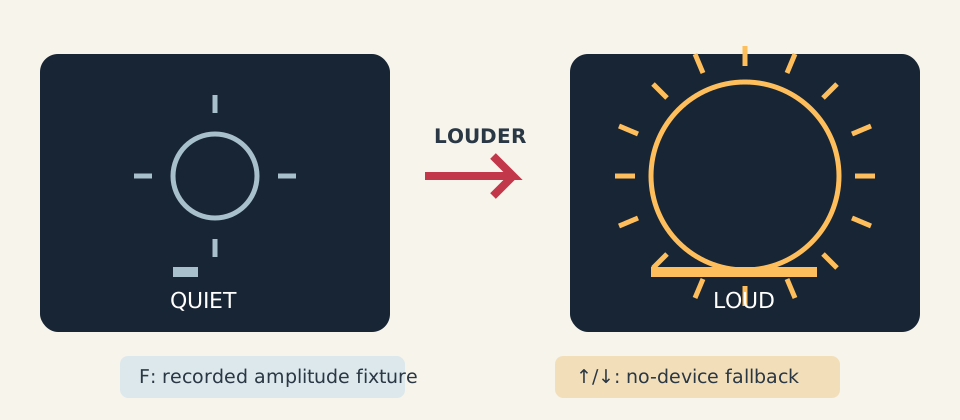
Louder input visibly makes one mark larger and denser; recorded and keyboard routes keep the mapping available without a microphone.
The rule is louder → bigger + more marks. Size, count, a meter, and an ACTIVE/QUIET label duplicate the cue, so hearing and color are never required. Use the course’s credited precedent notes to study immediate embodied feedback, not to copy a performer’s gesture or silhouette. Preserve creator, collaborator, and performer credits while changing the visual grammar, mapping, interaction, motion, and staging.
The optional microphone route reduces a short sound block to one amplitude from 0 to 1. Only that scalar crosses into the visual model. The model retains no waveform, sound, identity, timestamps, device metadata, or amplitude history.
Three sources enter one adapter
All sources produce the same normalized value:
recorded amplitude fixture ─┐
live microphone RMS ────────┼─> consumeAmplitude ─> state + geometry
keyboard no-device value ───┘
InputSource explicitly says recorded, live_microphone, or no_device.
The fixture contains synthetic scalars rather than captured sound. The optional
openFrameworks boundary uses
ofSoundStream
and reads callback frames and channels through
ofSoundBuffer
.
It computes one RMS amplitude over at most 4,096 frames, publishes that scalar
through a one-value mailbox, and retains no audio.
The program starts in no-device mode. Pressing L is the only action that requests
the selected default input. Tell nearby people, obtain consent, choose the
intended device in OS settings, and verify the visible LIVE MICROPHONE label.
N or exit stops and closes the stream. Setup failure visibly returns to keyboard
fallback. These choices follow the W3C’s broader
privacy and security considerations
:
make capture intentional and visible, minimize derived information, and stop
when it is no longer needed. Do not record, identify, or classify people.
Smooth first, then remove the quiet floor
Raw amplitude jitters. Exponential smoothing moves partway from previous value
s toward new value x:
s_new = s_old + alpha * (x - s_old)
With alpha 0.5 and readings 0.0, 0.05, then 0.4, smoothed values are
0.0, 0.025, and 0.2125:
0.025 + 0.5 × (0.4 - 0.025) = 0.2125
A dead zone removes the room-noise floor after smoothing:
level = 0                              when smoothed <= dead_zone
level = (smoothed - dead_zone) /
        (1 - dead_zone)                otherwise
With dead zone 0.1, the first two values stay quiet. The third normalized level
is (0.2125 - 0.1) / 0.9 = 0.125. Exactly 0.1 is quiet. Smoothing happens first
so the threshold acts on the same stable state the geometry sees.
The normalized value controls bounded geometry
radius = minimum_radius + u * (maximum_radius - minimum_radius)
rays = round(minimum_rays + u * (maximum_rays - minimum_rays))
active = u > 0
For u = 0.125, radius maps from 20–120 to 32.5. Rays map from 4–24 to
6.5; this implementation uses floor(value + 0.5), so the result is 7.
Radius, ray count, normalized level, activity, source, and accepted/rejected/
dropped counters are available before rendering.
Work never grows with sound duration. A batch consumes at most 256 amplitudes, a fixture at most 4,096 values, one callback at most 4,096 frames, and geometry at most 128 marks. Invalid negative or non-finite amplitude rejects transactionally; values above 1 clamp to 1. Oversize fixture replay rejects without replacing the prior state.
Practice
Practice is guided and has no unit-test gate. Calculate one replay, explore the recorded and no-device routes, optionally try consented live input, then repair one quiet-boundary mistake.
1. Calculate three input steps
Open exercises/15-embodied-audio-input/fixtures/amplitude-replay.txt without
running the suite. For alpha 0.5, dead zone 0.1, and readings 0, 0.05, 0.4,
reproduce smoothed values 0, 0.025, 0.2125 and normalized values 0, 0, 0.125.
Then map the third value to radius 32.5 and 7 rays. Compare every intermediate
column rather than skipping directly to final geometry.
2. Build the working solution without a microphone
Set OF_ROOT to openFrameworks 0.12.1. Linux or macOS:
scripts/section-15.sh generate --project solution
scripts/section-15.sh build --project solution --configuration Release
Launch the solution binary on Linux or its generated app bundle on macOS. Windows Developer PowerShell:
.\scripts\section-15.ps1 generate -Project solution
.\scripts\section-15.ps1 build -Project solution -Configuration Release
& .\exercises\15-embodied-audio-input\solution\bin\solution.exe
Use Up/Down and confirm the geometry and meter grow together while the label
says NO DEVICE. Press F to replay the synthetic fixture. P pauses, R restarts
the current source, and M reduces repeated marks. These routes make the complete
instrument usable without capture permission or hardware.
If you choose to try live amplitude, first obtain consent and select the intended
OS default input. Press L and require the LIVE MICROPHONE label; press N to
close the stream and return to keyboard control. If setup fails, continue with
N, F, and Up/Down. A compiler cannot prove device selection or permission UI.
3. Repair an exact-boundary activity bug
In exercises/15-embodied-audio-input/shared/audio_input_model.cpp, temporarily
change normalized > 0.0f to smoothed >= design.dead_zone. Rebuild the
solution and replay the fixture. At an input exactly on the dead-zone boundary,
normalized level and geometry should be quiet, but the altered expression marks
it active. Restore normalized > 0.0f, rebuild, and confirm the meter, label,
and geometry agree again.
If that was your only edit:
git restore -- exercises/15-embodied-audio-input/shared/audio_input_model.cpp
That command discards every uncommitted change in the named file.
Exercise
Problem: create an amplitude-responsive visual instrument
Keep the tested adapter and its three explicit sources. Choose response
parameters in starter/src/design/audio_instrument_design.cpp and create a
visual grammar in starter/src/ofApp.cpp whose input-to-output rule is
immediately inferable. Preserve visible source/activity, fixture replay,
keyboard fallback, bounded work, pause/reduced-motion routes, and no retention.
Use the Exercise 15 brief, starter, fixture, tests, and solution as the authoritative specification. The exercise never requires a live device; absence of a microphone or permission is not failure.
Run the unit tests
Linux or macOS:
CXX=g++ tests/run-section-15-tests.sh
CXX=clang++ tests/run-section-15-tests.sh
Windows Developer PowerShell:
.\tests\run-section-15-tests.ps1
Known cases pin all fixture rows and intermediate values. Boundary and property
checks cover the exact quiet floor, clamping, invalid amplitude and design,
work caps, oversize fixture rejection, repeatable replay, monotone geometry,
and bounded output. Wrapper probes reject an incomplete OF_ROOT before
cleanup. With a proven openFrameworks installation, generate and compile starter
and solution in Debug and Release, then launch no-device and fixture routes.
Live input, consent, device behavior, and the clarity of the mapping remain
manual checks.
You may use horizons, stacked glyphs, line weight, spacing, or symmetry instead of a sun, but loudness must remain monotone in at least one obvious dimension. Do not add recording, spectrum analysis, classification, camera input, unlimited history, or a second elective lane.
Quick visual check
- The input-to-output rule is clear through controls without spoken instruction.
- F and Up/Down work without a device; N visibly identifies fallback.
- L is opt-in after device selection and consent; N or exit stops capture.
- No waveform, sound, identity, timestamp, or device metadata is stored or logged.
- Size/count, meter, text, and shape provide cues independent of sound and color.
- P pauses; R replays; M reduces marks; nothing flashes.
- Below 680×360, high-contrast guidance replaces the composition and retains an essential N fallback key while one fixed-size glyph still fits.
- Geometry, composition, response, and palette differ from both examples.
- Capture alt text names input source and quiet/loud geometry; reused work is credited.
If you get stuck
Start with recorded input because it is repeatable. Then use the no-device route before debugging permissions. Live audio is optional; the sketch should remain complete when the microphone is unplugged, shy, or busy with a video call.