Images and type as geometry
This section turns a flat mask into measured points you can animate: learn the checked pixel-to-point pipeline, practice it on a tiny image, then build one tested image or type composition.
- Lesson: turn pixels into measured points
- Practice: count, run, and repair the pipeline
- Exercise: animate tested image geometry
Lesson
A mask can become a collection of marks
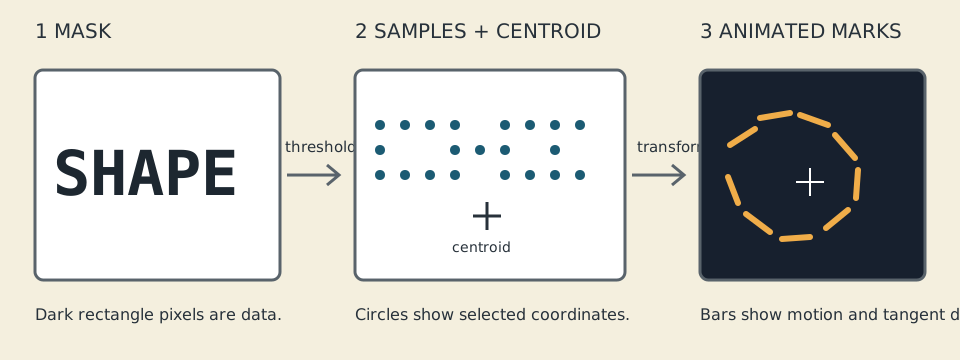
A flat mask becomes sampled points, measured geometry, and animated marks while retaining a visible centroid.
Circle samples, a crosshair centroid, labeled arrows, and bars communicate the stages without depending on color. Use the course’s credited precedent notes to study image or type data as geometry. Credit the source, use an original phrase or redistributable asset, and change sampling, topology, motion, mapping, palette, and composition.
An image is a grid of pixels stored as one long list. Color pixels usually hold several channel values—red, green, blue, and sometimes alpha. A threshold keeps pixels that answer a yes/no question such as “is this dark enough?” The kept pixels become points. Their centroid is the average x and y position.
Find one pixel safely
ofImage
decodes a file, while
ofPixels
provides its width, height, channel count, and bytes. The adapter checks
image.load, then copies the bytes into the pure model. The model therefore
owns its input and never keeps a pointer into an image that may be reloaded.
Rows are stored end to end. In a width-4 image, (2, 1) is pixel number
1 × 4 + 2 = 6. With three RGB channels it begins at byte 6 × 3 = 18:
pixel number = y × width + x
byte number = pixel number × channel count + channel
Before indexing, the helper checks nonzero dimensions, 1–4 channels, coordinates, multiplication and addition overflow, and a 4,194,304-pixel source cap. It never guesses after a failed check.
Grayscale uses its first channel. RGB and RGBA use pinned integer luminance:
Y = round((299*R + 587*G + 114*B) / 1000)
Alpha does not silently erase RGB. If transparency defines your mask, make it an explicit sampled rule and test it.
Threshold and stride produce points
For stride step, visit (0, 0), (step, 0), ..., then the next sampled row.
Dark selection includes luminance <= threshold; bright selection includes
luminance >= threshold. In a width-4 row and step 2, x values are 0 and 2,
never 4.
The main C++ mechanism is transforming an owned std::vector of points.
Sampling visits at most 100,000 grid positions and outputs at most 100,000
points. Step zero, unsafe dimensions, truncated bytes, excess work, and a
threshold that selects nothing return named statuses. Output commits only on
success, so a failed reload cannot leave a half-new collection.
Bounds and centroid summarize the shape
Scan selected points once for minima, maxima, and sums:
centroid = (sum(x_i)/N, sum(y_i)/N)
Points (0,0) and (2,2) have bounds from (0,0) through (2,2) and centroid
(1,1). This is a point centroid, not an area centroid: denser sampled regions
have more influence.
To transform around that center, subtract it, scale, rotate, restore it, and translate:
q = p - centroid
rotated = (q.x*cos(a) - q.y*sin(a), q.x*sin(a) + q.y*cos(a))
result = rotated * scale + centroid + translation
Count stays N. Translation moves the centroid by the same vector. Rotation
preserves pairwise distance; a positive scale multiplies every pairwise distance
by that scale. Non-finite values, non-positive scale, scale above 10,000, and
excess work reject transactionally.
Type contours use the same boundary
Type can enter without making font raster pixels a cross-platform oracle. Load a
font you created or may redistribute with
ofTrueTypeFont
,
then request outlines as
ofPath
contours. Paths can become resampled points or an
ofMesh
.
Font hinting, raster engines, and installed fonts vary, so tests gate pure
point/mask calculations. A type extension still needs a bundled font license,
work limits, explicit load failure, and a manual contour check.
Practice
Practice is guided and has no unit-test gate. Count one tiny mask, explore a working adapter, then repair one checked-indexing mistake.
1. Work the tiny mask by hand
Open exercises/14-images-and-type-as-geometry/fixtures/mask-oracle.txt without
running the suite. For its 3-by-3 cross, verify count 5, bounds 0–2 on both axes,
and centroid (1,1). Then answer these smaller questions:
- In a 4-by-3 one-channel image,
(2,1)is flat index 6. - With stride 2, visited x coordinates are 0 and 2.
- Points
(0,0)and(2,2)average to(1,1). - Rotating around the centroid preserves point count and distances.
2. Build and inspect the working solution
Set OF_ROOT to openFrameworks 0.12.1. Linux or macOS:
scripts/section-14.sh doctor
scripts/section-14.sh generate --project solution
scripts/section-14.sh build --project solution --configuration Release
Launch the generated solution binary or macOS app bundle. Windows Developer PowerShell:
.\scripts\section-14.ps1 doctor -OfRoot C:\path\to\of
.\scripts\section-14.ps1 generate -OfRoot C:\path\to\of -Project solution
.\scripts\section-14.ps1 build -OfRoot C:\path\to\of -Project solution -Configuration Release
Press R to reload, P to pause, and M to stop nonessential motion. Compare the
source mask, sampled points, centroid, and moving bars. Temporarily rename
solution/bin/data/seed-mask.png, reload, and confirm that a readable error
replaces the composition. Restore the file before continuing.
3. Repair a byte-index formula
In exercises/14-images-and-type-as-geometry/shared/image_geometry_model.cpp,
temporarily change pixel * channels + channel to
pixel + channels + channel. Rebuild and run the solution. A one-channel origin
may hide the mistake, while RGB positions and the end of the byte array expose
incorrect samples or a named failure.
Restore the multiplication and rebuild. If that was your only edit:
git restore -- exercises/14-images-and-type-as-geometry/shared/image_geometry_model.cpp
That command discards every uncommitted change in the named file.
Exercise
Problem: animate an image or phrase as geometry
Replace the mask with an original phrase or image you may redistribute. Choose
sampling and motion in starter/src/design/image_geometry_design.cpp, then
change the mark grammar in starter/src/ofApp.cpp or add properly licensed type
contours. Preserve explicit asset failures, work caps, checked indexing,
keyboard controls, and reduced motion.
Use the Exercise 14 brief, starter, fixture, tests, and solution as the authoritative specification. Your silhouette, sampling, motion, mark language, or palette must differ materially from both examples.
Run the unit tests
Linux or macOS:
CXX=g++ tests/run-section-14-tests.sh
CXX=clang++ tests/run-section-14-tests.sh
Windows Developer PowerShell:
.\tests\run-section-14-tests.ps1
The suite checks known tiny masks, row-major interleaved indices, one- through
four-channel luminance, inclusive threshold boundaries, stride, empty and
truncated input, work and source caps, transactional failure, bounds, centroid,
count preservation, translation, scaled distance, and a known rotation. With
OF_ROOT, generate and build starter and solution in Debug and Release and
manually exercise reload and missing-asset behavior. Tests do not compare pixels
or font raster output.
You may sample edges, build bounded scan-line ribbons or a mesh, map centroid distance to phase, or add a licensed font outline. Do not assume an installed system font is redistributable.
Quick visual check
- R reloads; P pauses without hidden model changes; M stops nonessential motion.
- Missing, malformed, and empty-threshold assets show readable errors.
- Shape and position—not only color—communicate the composition.
- Small and large windows keep finite, bounded geometry without flashing or required audio.
- Image or font creator, source, and redistribution license are recorded.
- The result differs from both examples in more than palette.
- Capture alt text names the source shape, sample treatment, centroid, and motion.
If you get stuck
Inspect width, height, channel count, and one byte index before changing the artistic idea. Return to the tiny fixture whose pixels you can count by hand. An upside-down, empty, or enormous result is usually easier to diagnose as data first and composition second.