Color, blending, and trails
This section has one path: learn how palette interpolation, alpha composition, and decay describe a trail, practice the arithmetic and renderer boundary, then solve one tested two-palette study.
- Lesson: understand color, alpha, and age
- Practice: calculate, compare, and repair
- Exercise: create a tested trail study
Lesson
Two paths reveal color and time
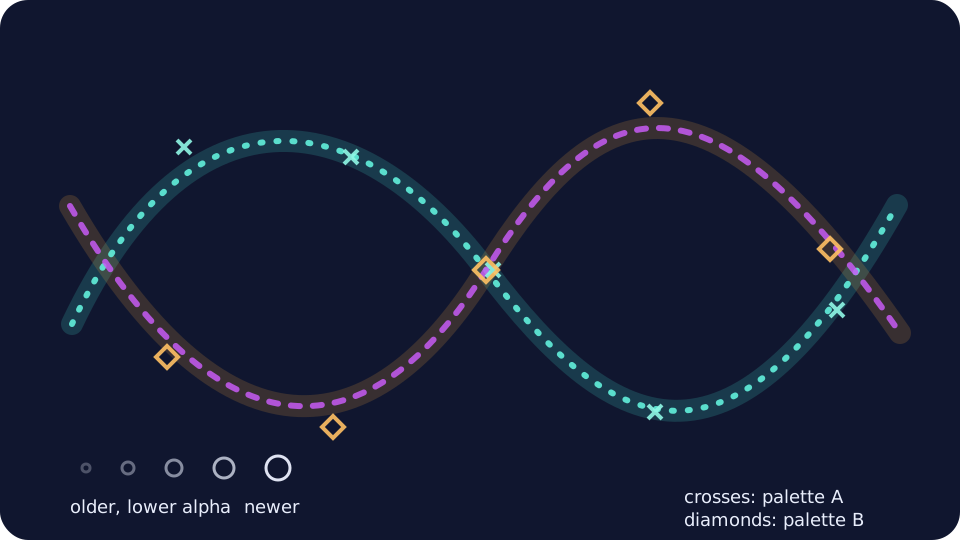
Two palettes cross; shape identifies each path, while size and alpha reveal age and overlap.
Each color stores red, green, blue, and alpha. Alpha says how strongly a new color covers what is already there: 0 is invisible, 1 is fully opaque, and 0.5 is halfway. A trail draws older samples with less alpha. Crosses and diamonds identify the two palette roles without color, while size and alpha show age.
Interpolate checked color data
Color stores straight RGBA channels in [0, 1]; straight means RGB has not
already been multiplied by alpha. A Palette has two endpoint colors.
paletteColor interpolates every channel:
channel(t) = first_channel + (second_channel - first_channel) * t
At t = 0 and t = 1, the exact endpoints return. A palette from
(0.1, 0.2, 0.3, 1) to (0.9, 0.6, 0.3, 0.5) has midpoint
(0.5, 0.4, 0.3, 0.75). Non-finite or out-of-range amounts reject. Tests sample
101 amounts and require every channel to stay between its endpoints and within
the unit interval.
Plain Color, Palette, TrailSample, and TrailMark records form the data
boundary. No renderer color, global random source, wall clock, or GPU state
enters the pure model.
Source-over alpha is a weighted average
Draw half-visible red (1, 0, 0, 0.5) over solid blue (0, 0, 1, 1). Half of
the result comes from each, producing opaque purple:
output alpha = 0.5 + 1.0 × (1 - 0.5) = 1.0
output color = red × 0.5 + blue × 0.5 = (0.5, 0, 0.5)
The general source-over calculation is:
Ao = As + Ab × (1 - As)
Co = (Cs × As + Cb × Ab × (1 - As)) / Ao
Cs, As describe the new source; Cb, Ab describe the existing background;
Co, Ao describe the result. If output alpha is zero, the helper returns
transparent black. The W3C compositing standard
defines source-over and distinguishes composition from artistic blend modes.
Real pixels also depend on color space, antialiasing, and graphics settings, so
tests check channels rather than screenshots.
Exponential decay turns age into persistence
The newest sample has age zero. If each step retains fraction r, an age-n
mark has:
alpha(n) = initial_alpha * r^n
Starting at alpha 0.75 and retaining 0.8 gives
0.75 × 0.8 × 0.8 = 0.48 at age 2. When retention stays in [0, 1], each older
mark is no stronger than the next. The model limits history to 4,096 samples,
derives age from oldest-to-newest order, and leaves prior good output unchanged
if any new sample or calculated mark is invalid.
Model composition and renderer blending stay separate
The pure model provides source-over arithmetic and repeatable TrailMark data.
The starter adapter requests normal alpha blending; the solution requests
additive blending. Blend mode is a renderer decision scoped with the
openFrameworks graphics state API
:
ofPushStyle();
ofEnableBlendMode(OF_BLENDMODE_ADD);
// draw only from repeatable TrailMark values
ofDisableBlendMode();
ofPopStyle();
Matrix changes also use matched push/pop calls. Drawing never owns the only copy of age, palette identity, alpha, or radius.
Each sample carries palette index 0 or 1 and an interpolation amount. The starter uses circles and squares; the solution uses crosses and diamonds. P pauses, R clears and replays phase, and M keeps current marks only. Pointer and arrows move the same visible origin. Reduced motion, shape roles, and age cues preserve meaning without color or audio.
Practice
Practice is guided and has no unit-test gate. Calculate one palette, overlap, and decay case, compare the two adapters, then repair one visible age error.
1. Work the arithmetic oracle
Calculate before opening the fixture:
- midpoint between
(0.1, 0.2, 0.3, 1)and(0.9, 0.6, 0.3, 0.5); - half-red over solid blue; and
- alpha 0.75 retained by 0.8 for two age steps.
Then compare your answers with the independent rows. Linux or macOS:
cat exercises/12-color-blending-and-trails/fixtures/trail-oracle.txt
Windows Developer PowerShell:
Get-Content .\exercises\12-color-blending-and-trails\fixtures\trail-oracle.txt
The answers are (0.5, 0.4, 0.3, 0.75), opaque (0.5, 0, 0.5), and 0.48.
Identify which values are model data and which final appearance still depends on
the renderer.
2. Trace one trail plan
For three oldest-to-newest samples, model ages are 2, 1, 0. With radii 2 to
10, the marks receive radii 2, 6, 10. With opaque palette colors, base alpha
0.75, and retention 0.8, their alphas are 0.48, 0.60, 0.75. Find those steps
in buildTrailMarks and explain why palette alpha can lower them further.
3. Compare normal and additive adapters
Set OF_ROOT to openFrameworks 0.12.1. Linux:
scripts/section-12.sh generate --project starter
scripts/section-12.sh build --project starter --configuration Release
exercises/12-color-blending-and-trails/starter/bin/starter
On macOS, generate and build solution, then open its generated .app. Windows
Developer PowerShell:
.\scripts\section-12.ps1 generate -Project starter
.\scripts\section-12.ps1 build -Project starter -Configuration Release
& .\exercises\12-color-blending-and-trails\starter\bin\starter.exe
Repeat the same generate/build commands with solution on Linux and Windows;
on macOS, generate and build each project and open its generated .app. Launch
both projects. Compare normal-alpha paired ribbons with the additive star loom.
Look for overlap brightness, geometry, density, and any renderer state that leaks
into drawing after the trail block.
4. Repair an off-by-one age
In exercises/12-color-blending-and-trails/shared/color_trail_model.cpp,
temporarily change:
const std::size_t age = history.size() - 1 - index;
to:
const std::size_t age = history.size() - index;
Rebuild and run the starter. Even the newest mark now decays once. Restore the original expression and confirm the newest mark returns to full configured strength. If this was your only intended edit:
git restore -- exercises/12-color-blending-and-trails/shared/color_trail_model.cpp
That command discards every uncommitted change in the named file.
Exercise
Problem: create a two-palette trail study
Start from a particle-memory or gesture idea. Keep limited oldest-to-newest
samples, create two explicit palette roles, and control persistence through
alpha, size, spacing, or geometry. Edit starter/src/design/trail_design.cpp
for palette endpoints, decay, opacity, radii, and history, then edit
starter/src/ofApp.cpp for motion or gesture source, blend mode, geometry, and
composition. Preserve checked channels, finite guards, pure plan output,
keyboard access, reset, reduced motion, and scoped renderer state.
Use the two-palette trail study exercise brief as the authoritative source for editable files, constraints, commands, fixtures, and the explained solution.
Run the unit tests
Linux or macOS:
CXX=g++ tests/run-section-12-tests.sh
CXX=clang++ tests/run-section-12-tests.sh
bash -n scripts/section-12.sh tests/run-section-12-tests.sh
shellcheck scripts/section-12.sh tests/run-section-12-tests.sh
scripts/check-authoring.sh
Windows Developer PowerShell:
.\tests\run-section-12-tests.ps1
The pure suite covers palette endpoints and monotonic channel bounds, source-over known cases and exact transparent boundaries, decay values and monotonicity, oldest-to-newest age and radius plans, malformed fixture cardinality, non-finite rejection, history caps, bad-input preservation of prior output, deterministic replay, and learner design ranges. Build starter and solution in Debug and Release, then launch both; tests do not compare graphics pixels.
Quick visual check
- Two palettes remain identifiable from shape when hue differences are hidden.
- Old-to-new order uses alpha plus size, spacing, or another non-color cue.
- P pauses, R resets phase and history, M removes persistence, and pointer and arrows move the same visible origin.
- Normal and additive treatments differ intentionally; drawing afterward shows no leaked blend, fill, line width, color, or transform state.
- Text contrast remains readable; nothing flashes or communicates through audio alone.
- Resize and tiny windows remain safe without obvious cross-window artifacts.
- Path source, palette roles, geometry, decay, density, composition, and blend treatment differ from both examples.
- Alt text names both shape roles, overlap, age order, controls, and reduced-motion behavior; reused work remains credited.
If you get stuck
If the trail becomes a muddy rectangle, clear the frame and draw one mark. Check its RGBA values, then decay age, then renderer state before restoring the full history. A two-color, three-sample example usually reveals the error faster than a whole particle orchestra.