Depth, light, and dense populations
This lesson adds a small, practical 3D lane. It does not add shaders, physics, or a general 3D engine. One reusable rounded primitive, a deterministic population model, a camera, depth testing, and two lights are enough to make a dense field feel spatial.
- Lesson: turn clustered records into lit volume
- Practice: separate model, camera, and light
- Exercise: build a two-light pebble cloud
Lesson
Density becomes legible when forms share neighborhoods
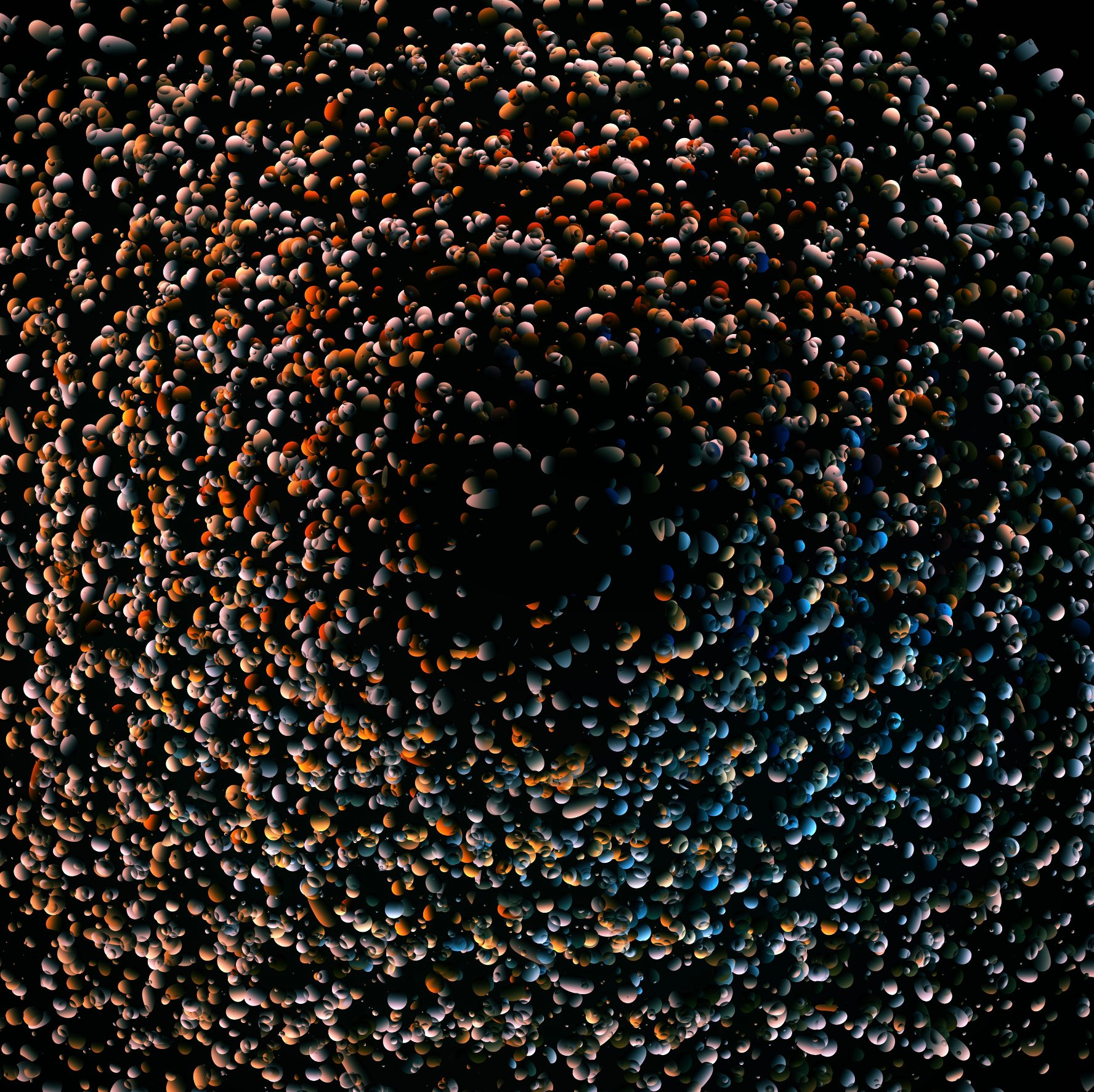
Course-owner-supplied reference attributed to Zach Lieberman. We use it to study clustered mass, inherited variation, depth, voids, and restrained colored light without claiming to know the original code.
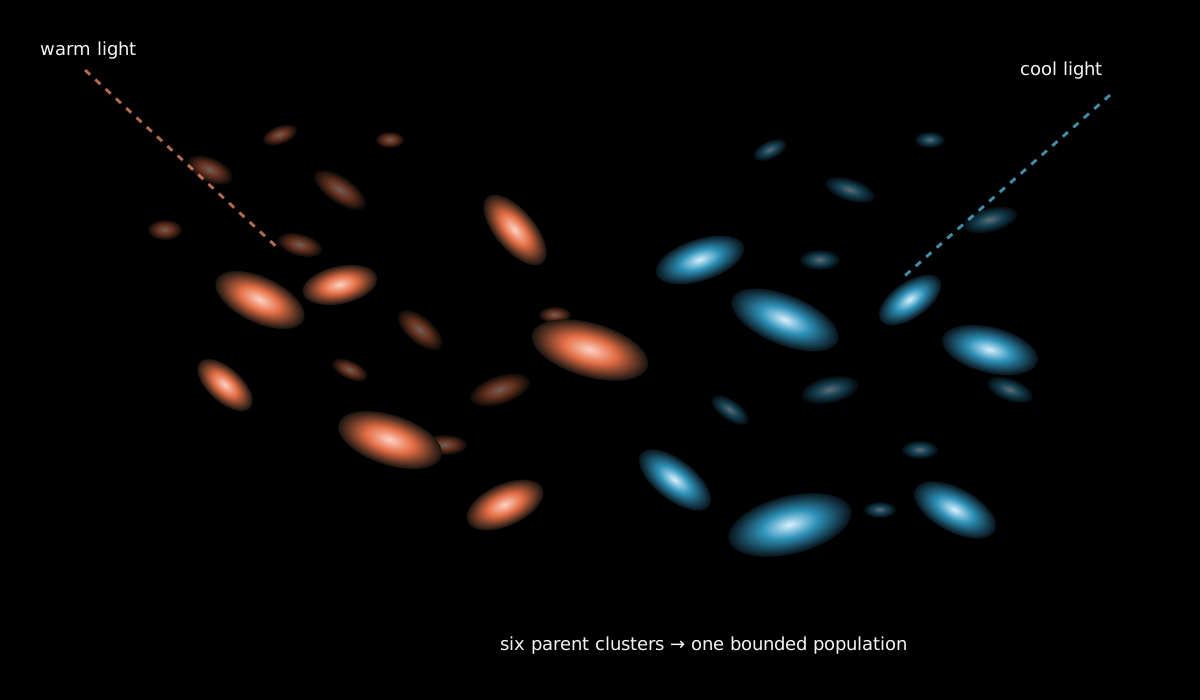
The original course diagram turns those observations into a bounded model: six cluster records organize position, orientation, scale, and material before lighting reveals the result.
A still image of a dense form does not tell us its exact implementation. Rather than imitate one surface, we will transfer four useful mechanisms:
- many simple forms can read as one mass;
- clusters create neighborhoods and voids;
- inherited scale and orientation create local rhythm; and
- a restrained warm/cool light pair can reveal volume without assigning a random color to every object.
Generate parents before children
The model first makes a few Cluster records:
struct Cluster {
    Vec3 center;
    Vec3 preferred_rotation;
    float spread;
    float typical_scale;
    int material_role;
};
Each pebble chooses one cluster, then stays near that cluster’s values:
position = cluster center + center-biased local offset
rotation = cluster preferred rotation + at most 18 degrees
scale    = cluster typical scale * small multiplier
material = cluster material role
With six clusters and 720 pebbles, the model makes six large compositional choices and many bounded local ones. Compare that with 720 independent positions, rotations, scales, and colors: more random calls produce less visible structure.
Averaging three uniform draws makes offsets favor zero. In one dimension:
offset = (draw_a + draw_b + draw_c) / 3 * spread
The range stays -spread to +spread, but values near the cluster center become
more common. This is section 06’s center bias used in three dimensions.
Perspective changes apparent size
A three-dimensional point has x, y, and z. The camera turns that point into a
screen position. Nearby objects appear larger; distant objects appear smaller.
The starter uses
ofEasyCam
so you can orbit the mass without writing camera matrices.
The depth buffer remembers the nearest drawn surface at each screen pixel.
With ofEnableDepthTest
,
a near pebble hides a far one regardless of drawing order. Without it, the last
object drawn appears on top and the mass flattens into confusing cutouts.
A stretched sphere is enough
The renderer draws the same low-resolution sphere repeatedly. Local transforms translate, rotate, and scale it:
ofTranslate(position.x, position.y, position.z);
ofRotateXDeg(rotation.x);
ofRotateYDeg(rotation.y);
ofRotateZDeg(rotation.z);
ofScale(scale.x, scale.y, scale.z);
ofDrawSphere(1.0f);
Unequal scale turns the sphere into an elongated pebble. This is not a true capsule with a cylindrical middle, but it provides rounded normals, silhouette variation, and one reusable primitive. The model stores only transforms and material roles, so no-window tests can inspect the composition without a GPU.
Normals tell a light which way the surface faces
A normal is a short direction pointing out from a surface. A light compares its direction with that normal. A surface facing the light receives more diffuse light; a surface turning away receives less. The sphere primitive already has normals, so this lesson uses them rather than calculating a mesh from scratch.
The official ofLight reference
and ofMaterial reference
show the renderer objects used in the starter. One warm light and one cool light
are enough. The material family changes the base response; individual pebbles do
not draw unrelated RGB values.
Lighting is a manual visual check. Tests can prove that roles and transforms are valid, not that every GPU produces identical highlights.
Density has three separate budgets
A dense scene can become slow in three ways:
- population count: how many transform records update and draw;
- mesh detail: how many triangles each sphere contains; and
- screen coverage: how many fragments large near objects paint.
Do not “optimize” by guessing. Change one budget at a time. The starter caps the
population at 2,000, uses a low sphere resolution, and lets M draw only a
subset while stopping automatic rotation. That route is useful for reduced
motion and for diagnosing whether count is the bottleneck.
Custom shaders and hardware instancing remain outside this lesson. They become worth learning only after this CPU-side model and its visual relationships are clear.
Practice
1. Trace one inherited pebble
For a cluster centered at (40, -20, 10) with preferred rotation (5, 30, 0),
work out a pebble with local offset (-8, 4, 12) and rotation jitter (3, -6, 2):
position = (32, -16, 22)
rotation = (8, 24, 2)
If the cluster’s typical scale is 5 and the multiplier is 1.2, the base scale is
6. Stretching x by 2 makes (12, 6, 6). Name the values that should change if the
cluster moves, and the ones that should remain local.
2. Build and inspect the solution
Linux or macOS:
scripts/section-17.sh generate --project solution
scripts/section-17.sh build --project solution --configuration Release
Windows Developer PowerShell:
.\scripts\section-17.ps1 generate -Project solution
.\scripts\section-17.ps1 build -Project solution -Configuration Release
Drag to orbit. Press P to stop automatic rotation, M for reduced detail, R
for replay, and N for a new seed. Look for neighborhoods rather than individual
“nice” pebbles.
3. Repair a flat draw
Temporarily comment out ofEnableDepthTest() in the starter renderer. Orbit
until distant objects incorrectly cover near ones. Restore depth testing, then
temporarily give every pebble a completely random material role in the model.
The first mistake breaks spatial ordering; the second breaks family resemblance.
Restore both edits before the exercise.
If these were your only changes:
git restore -- exercises/17-depth-light-and-populations/starter/src/ofApp.cpp exercises/17-depth-light-and-populations/shared/population_model.cpp
Exercise
Problem: build a clustered two-light population
Create a bounded 3D population on a dark background. Keep 2–12 parent clusters, no more than 2,000 child forms, inherited material and orientation, positive bounded scales, depth testing, one reusable rounded primitive, two restrained lights, orbit controls, replay, pause, and reduced detail. Change cluster layout, voids, form proportions, camera, material response, and light placement so the result is structurally yours.
Use the
section 17 exercise brief
for editable files and fixed contracts. Begin with cluster/count/scale choices in
starter/src/design/population_design.cpp, then change lighting and drawing in
starter/src/ofApp.cpp.
Run the tests
Linux or macOS:
CXX=g++ tests/run-section-17-tests.sh
CXX=clang++ tests/run-section-17-tests.sh
Windows Developer PowerShell:
.\tests\run-section-17-tests.ps1
The tests check deterministic cluster and pebble records, finite bounded positions, inherited material and rotation, positive elongated scales, invalid settings, and the 2,000-form work cap. Camera, occlusion, highlights, and GPU appearance stay in the manual review.
Quick visual check
- The scene reads as clusters and voids, not uniformly scattered confetti.
- Orbiting reveals stable near/far occlusion with no drawing-order popping.
- Warm and cool lights describe volume; material role is not communicated by color alone.
PandMprovide still and reduced-detail views, and help text names keyboard controls.- Tiny and wide windows remain usable; no form produces a giant or non-finite transform.
- Your cluster layout, silhouette rhythm, light placement, and camera differ from the examples.
If you get stuck
Pause first. Draw only the cluster centers as large wireframe spheres, then add one pebble per cluster. If the mass is flat, verify depth testing before changing the camera. If lighting is black, confirm lighting, both lights, and one material are enabled inside the camera block. If the frame rate falls, reduce population count, sphere resolution, and near-object scale one at a time.